



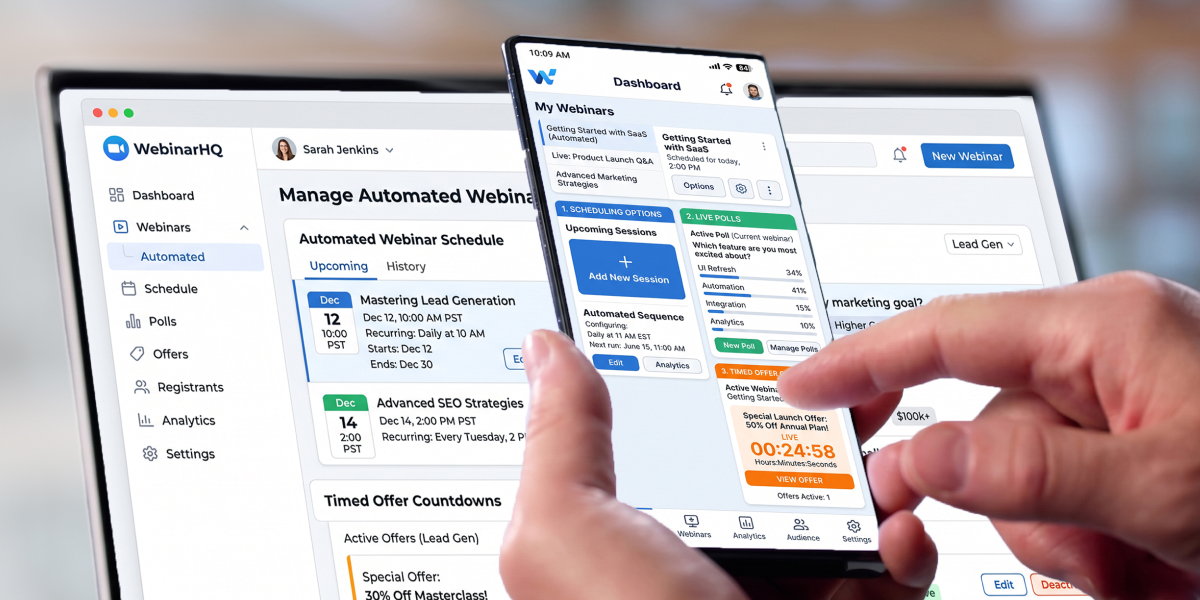
You’ve opened four comparison guides, and every one of them ranks a different platform first.
That’s not a coincidence, and it’s not because the market is genuinely that split. It’s because almost every “best automated webinar platforms” list you’ll find was written by a company that sells one, and the one they sell always wins.
We’re one of them. So here’s a different offer: instead of telling you which automated webinar software to buy, this guide gives you the five criteria that actually move conversions, and a way to test each yourself during a free trial. Scheduling, urgency, chat, replay control, and analytics.
By the end you’ll be able to evaluate any automated webinar platform on the page in front of you, including ours, without taking anyone’s word for it.
Table of Contents
Why every comparison guide is compromised
Almost every ranked list of automated webinar platforms is published by a vendor in the category. Look at the byline before you look at the rankings.
You’ll notice a pattern. The publisher is always first, the platform closest to them in positioning gets criticized hardest, and the criteria chosen are remarkably often the exact ones the publisher wins on.
This guide has the same conflict. We sell an automated webinar platform, so treat our conclusions with the suspicion you’d apply to anyone else’s. What we can offer is the framework, criteria you can apply yourself, with tests you can run in a free trial, so the evidence comes from your account rather than our marketing.
The other thing to distrust is the statistics. Comparison guides in this category quote attendance and conversion benchmarks constantly, and most of them don’t survive being followed to their source. The widely-repeated claim that evergreen webinars attend at 60–70% against 25–30% for live traces back to a single marketing consultant’s blog post with no sample, no methodology and no study behind it. Other figures cite platforms’ own self-reported averages, which are measured on their own customers and published by their own marketing teams.
There is no reliable independent benchmark for automated webinar attendance. Measure your own baseline across the first few sessions and use that number instead of anyone else’s.
Who’s actually in this market?
Before the criteria, it helps to know what you’re comparing. Automated webinar platforms fall into three rough groups, and the group matters more than any individual feature list.
Built for automation first. EverWebinar and eWebinar sit here, along with StealthSeminar and WebinarKit. In evergreen webinar software, pre-recorded presentations are the core product rather than a mode bolted on, so scheduling and interaction timing tend to be deeper.
Live platforms with automation added. Demio, Livestorm, EasyWebinar, WebinarGeek, WebinarNinja, ClickMeeting and BigMarker all run live webinars and offer automated ones as a second mode. The trade is usually that automation gets fewer controls, and in several cases you can’t combine scheduling formats in a single webinar. WebinarJam belongs in this group too, as the live counterpart to EverWebinar.
Video conferencing tools stretched into the role. GoTo Webinar and Zoom Webinars are live-first products where automated sessions require workarounds. Fine if they’re already in your stack, weak if automation is the point.
Two things to avoid buying by mistake: virtual events platforms handle multi-day summits and are a different discipline, and plain video hosting isn’t automation at all, a gated recording has no scheduling, no timed offers and no follow-up logic.
None of this is a ranking. It’s a starting point for the five questions below.
Criterion 1: Can it match the session to the viewer?
Scheduling is the highest-leverage setting on any automated webinar platform, because it decides your attendance rate before the presentation starts.
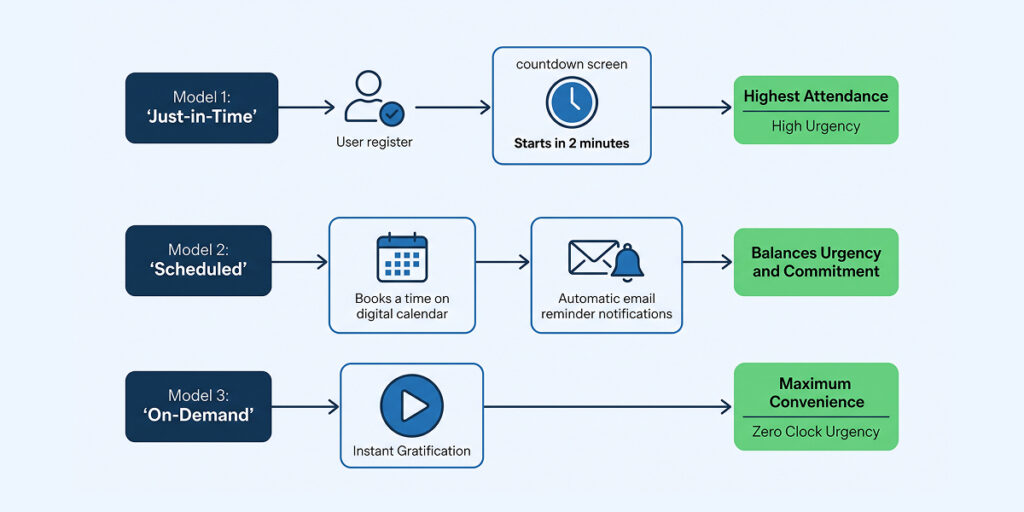
Three models, and each trades attendance against urgency:
Just-in-time sessions start minutes after someone registers. Nobody has time to forget, so attendance rate is the highest of the three. The cost is that a session always about to begin strikes some audiences as convenient to the point of being suspicious. Just-in-time webinars suit cold paid traffic especially well, since those visitors rarely come back for an appointment.
Scheduled runs at fixed times, creating a real appointment with room for reminder emails to work. You also get a no-show rate.
On-demand plays whenever the viewer arrives. Attendance approaches total, urgency approaches zero.
What to check in a trial: can the platform run all three, and can it run more than one for the same webinar without you rebuilding it?
That second question separates the field. Several well-reviewed platforms make you create a separate listing for each scheduling mode, which means duplicated setup every time you want to test one against another. Automatic time zone adjustment is the other thing to verify, without it you’ll lose registrants to arithmetic.
Check the registration pages too. Most platforms generate one per webinar, but the amount of control varies enormously, and a page builder you can’t shape is a page builder you’ll end up working around.
Criterion 2: Can you place urgency where it belongs?
Timed offers and countdowns are the mechanical advantage automation has over live. In a live session you’re guessing when to pitch. In an automated one you know exactly where the offer lands, which means you can place it precisely and then test moving it.
The question is how much control you actually get.
What to check:
- Can you set the exact playback timestamp for timed offers and CTAs, or do they appear from the start of the session?
- Can you change that timestamp after launch without re-uploading the video?
- Do countdown timers run from that registrant’s session, or from a fixed calendar date?
- If you sell directly in-session, does it support paid webinars with a real checkout rather than a link out?
The last one matters more than it sounds. A timer tied to a fixed date will show a different number to everyone who arrives, and eventually it’ll show a deadline that has already passed. Timers that run on each viewer’s own clock are the only version that holds up.
And be honest about the deadline. If your offer doesn’t actually close, don’t build a timer that says it does. Audiences check, and a deadline that quietly extends damages every other claim you made in the session.
Criterion 3: What happens when someone has a question?
This is where automated webinar platforms differ most, and where the marketing gets loudest.
Four approaches exist in the market:
Real two-way chat: a moderator responds during the session or by email afterward. The most genuine, and it requires either staffing or an asynchronous system.
Hybrid: the recording plays while a person works the chat live. Real conversation, at the cost of somebody being present.
Simulated chat: messages scheduled to appear at set timestamps. Adds atmosphere, and it’s the feature the category argues about.
Contact form only: attendees submit questions and get a reply later.
What to check: which of these the platform supports, whether chat works for on-demand webinars or only scheduled ones, and whether you can reposition interactions after launch.
Look at the interaction library while you’re there. Polls, Q&A, handouts and quizzes each do a different job: a poll resets attention, a quiz reinforces a teaching point, a handout gives people a reason to stay. Count the types available, and check whether you can place each on the timeline yourself.
One thing that won’t appear on an automated platform’s list: screen sharing. That’s a live webinar feature, and its absence isn’t a gap; pre-recorded presentations already contain whatever you shared when you recorded.
The honest framing is that none of these is universally right. A training webinar for existing customers needs real chat. A top-of-funnel sales presentation running 40 times a week can’t be staffed. Match the approach to the session, not to whichever one a vendor’s homepage is built around.
Criterion 4: Do you control the replay?
Replay control is the criterion buyers think about least and regret most.
An automated webinar isn’t finished when the session ends. A meaningful share of purchases happen afterward, from people who missed the live slot or left early. If your platform hands out an evergreen link with no expiry, you’ve removed every reason to watch today.
What to check:
- Can you set a replay window and have it actually close?
- Does the replay deadline tie to the viewer’s session, or to a fixed date?
- Do replay viewers get counted separately in your reporting, or blended into attendance?
That last point trips people up. If replay viewers are folded into your attendance number, you can’t tell whether your live-slot attendance is improving or whether more people are simply watching later. Two different problems, two different fixes.
Criterion 5: Does it show you where people leave?
Registration and attendance counts are the floor. On their own they tell you a webinar underperformed without telling you why.
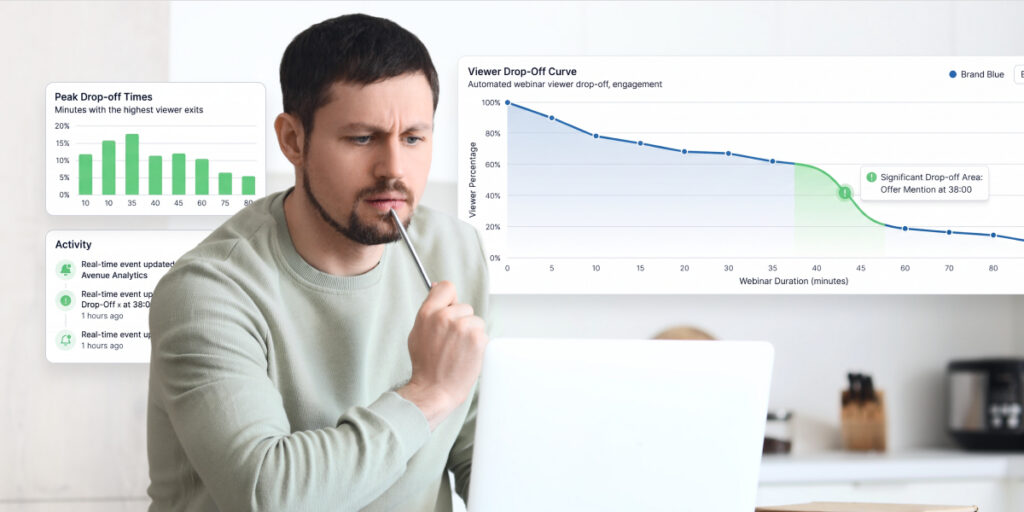
The number that changes decisions is the drop-off curve, where in the session viewers exit, and whether there’s a consistent cliff. Without it, offer placement is guesswork. With it, criterion two becomes an informed decision.
What to check: does the platform show second-by-second retention, or only summary totals?
Also worth having: attendance at the offer moment, CTA click rate, and traffic attribution. That last one matters especially for evergreen, because registrations arrive for months and you need to know which channel is still delivering in week twelve, not just which one delivered at launch.
And check what reaches your CRM. “Connects to CRM” can mean anything from passing an email address to passing watch time and offer-click behavior. Only the second version lets you segment follow-up by what someone actually saw.
Look at how the integrations work, not just how many there are. Native connections to your email platform and CRM behave differently from Zapier, which is flexible but usually passes fewer fields. If lead capture data has to reach your other marketing tools intact, test that in the trial rather than trusting the logo grid.
Two more things worth checking on the analytics dashboard: whether it distinguishes live-slot attendance from replay views, and whether webinar analytics can be filtered by traffic source. Lead generation programs live or die on that second one.
The simulation question
This is the loudest argument in the category, and it deserves a straight answer rather than a marketing one.
Most automated webinar platforms can display simulated chat messages, attendee counts, and join notifications on a recording. Competitors who don’t offer these features describe them as deceptive. Competitors who do describe them as engagement tools. Both are being selective.
Here’s the version we’d actually defend.
Simulating the room is reasonable. A live audience genuinely changes how a session feels, and stripping every trace of one out leaves something flat that nobody wants to sit through. An attendee count and an active chat window create the atmosphere the content was recorded for.
Simulating the people is where it goes wrong. Scripted comments appearing at fixed timestamps get noticed, usually by the one attendee who watches twice, and the screenshot travels further than the webinar ever did. Fabricated testimonials mid-session are worse, and the downside isn’t proportional to the conversion gain.
Hybrid webinars sidestep the argument entirely. The recording plays while you or someone on your team answers the chat live. Real conversation, recorded teaching. It costs an hour of attention per session, the thing automation was supposed to give back, which is why most people who like the idea never run it. Worth it during a launch, hard to justify daily.
And plenty of operators simply disclose the session is pre-recorded and convert perfectly well, because the audience came for the content. Whether that works for you depends on how much of your pitch leans on liveness. If the answer is most of it, that’s worth knowing about your pitch.
What to check in a trial: which simulation features can be switched off individually. A platform that forces an all-or-nothing choice is making the decision for you.
How to run the trial
Every platform worth considering offers a free trial. Use it properly and you’ll learn more in an afternoon than from any comparison guide, this one included.
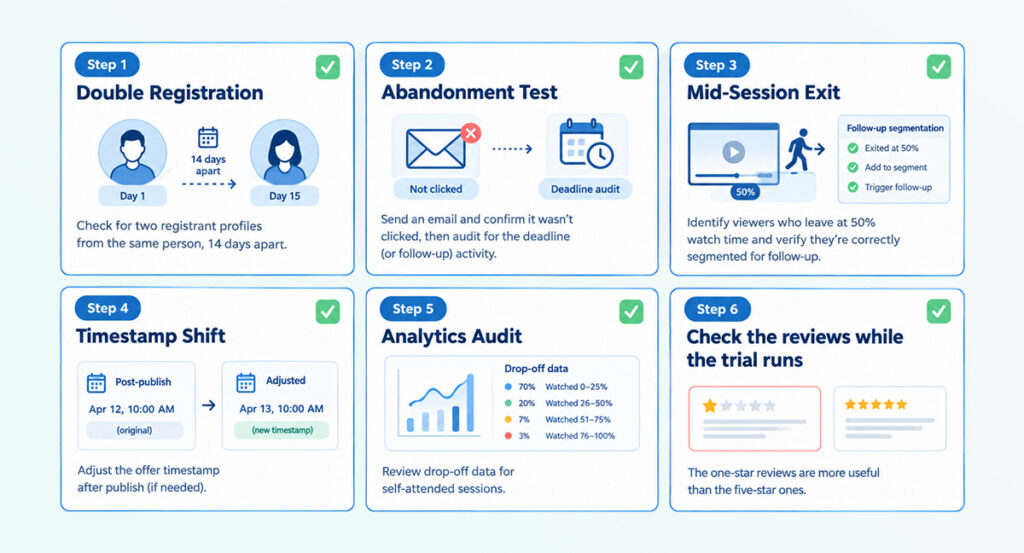
Register for your own webinar twice, a fortnight apart. Check whether the second run tells you the same story as the first. Timers configured independently drift, and they drift in the direction that makes you look dishonest.
Then abandon one registration. Don’t attend, don’t click anything, and watch what arrives over the following week. You’re looking for emails that fire after the offer has closed, replay links that outlive their deadline, and reminders for a session that already happened.
Attend one session and leave halfway. Check whether the follow-up you receive reflects that, or whether you get the same message as someone who never showed.
Move an offer’ s timestamp after publishing. Some platforms require a full re-upload. You’ll want to know before you’ve built a funnel around it.
Then read your own analytics. Can you see where you dropped off? If the dashboard can’t tell you that about a session you personally attended, it won’t tell you about anyone else’s.
And check the reviews while the trial runs. Capterra and G2 carry verified reviews for every platform in this category, ours included. The one-star reviews are more useful than the five-star ones, because they tell you what breaks at scale rather than what demos well.
If you handle EU data, confirm the platform is GDPR compliant before you get attached to it. That’s a procurement question, not a feature question, and it’s easier to answer now than after you’ve built a funnel.
Where EverWebinar fits
Applying our own framework, honestly.
Scheduling: all three models, just-in-time, scheduled and on-demand, configurable from one setup, with automatic time zone adjustment. You can test one against another without rebuilding.
Urgency: timed offers and countdowns run on each registrant’s own session clock rather than a fixed date.
Chat: simulated chat, polls, and handouts on timestamps you control, plus hybrid mode for real conversation when you can staff it. Not real asynchronous two-way chat; if that’s your non-negotiable, a platform built exclusively around it will serve you better.
Replay: configurable windows tied to the individual session.
Analytics: registration, attendance, watch time and drop-off markers.
The WebinarJam connection is the strongest argument for us and the weakest for anyone else. If your live webinars already run on WebinarJam, Replica Replay imports one- video, chat, polls, offers- rather than making you rebuild. That also means two products and two subscriptions, which is a real cost worth weighing.
Where webinar automation tends to pay off best is repeated content: evergreen sales presentations, onboarding, and product demos you’d otherwise deliver by hand every week. If your webinar marketing depends on a different session every time, automation has less to give you.
One thing EverWebinar genuinely doesn’t do well, confirmed internally. Competitor articles cite dated registration templates, basic analytics relative to newer platforms, and clone-and-schedule bugs. Verify which of those is fair and say it plainly. A page that names a real constraint is the only kind anyone believes.
Head-to-head comparisons against specific platforms live on our comparison pages.
Common questions
What is the best automated webinar software?
There isn’t a single answer, and any guide that gives you one is selling something. The right platform depends on which of the five criteria matter most to your program. If you need genuine two-way chat without staffing every session, choose a platform built around that. If you need live and automated in one tool, choose one that does both properly. If you’re automating a proven live webinar and want scheduling and offer control, choose a dedicated evergreen platform.
How do I choose?
Shortlist three, then run the same trial on each: register twice a fortnight apart, abandon one registration to see what arrives afterward, attend and leave halfway to test follow-up segmentation, move an offer timestamp, and read your own drop-off data. The platform that survives all five is your answer.
Are automated webinars the same as on-demand webinars?
Not quite. On-demand starts whenever the viewer arrives. Automated is the broader category, covering on-demand, just-in-time and scheduled sessions. Most programs end up running more than one model, split by traffic source. More on the distinction in our guide to what an evergreen webinar is.
Do automated webinars convert as well as live ones?
There’s no trustworthy public benchmark, the figures in circulation come from vendor marketing rather than independent measurement. Expect to trade some conversion rate for a large increase in session volume, and measure your own live baseline before you automate so you have something to compare against.
Should I use one platform for live and automated, or two?
It depends which you’d rather compromise. A combined platform means one subscription and one dashboard, usually with automation as the weaker half. Two dedicated tools means better tooling for each mode and a seam between them. Neither answer is wrong; the vendors arguing loudest for one are the ones selling it.
What should I do before automating a webinar at all?
Run it live several times until the conversion rate is consistent. Automation multiplies whatever you feed it, so a session that converts poorly live converts poorly evergreen at higher volume. If yours already runs but isn’t converting, this covers what to check first