
Simulated Live Webinars

Simulated live webinars that feel like real events.
Stop burning out on weekly live webinars. Give people real start times and event energy—without live presenting.

Live-event energy—without living on your calendar.
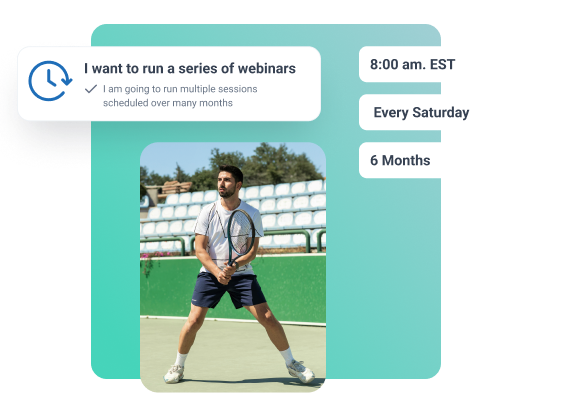
Interface showing automated webinar scheduling options with a tennis player image and fixed start time settings for recurring sessions.

Fixed starts

Real start times create commitment and momentum.
Green Checkmark
Scheduled commitment
Scheduled sessions people actually plan and attend.
Green Checkmark
Cohort momentum
Cohort-style viewing: everyone starts together live-like.
Green Checkmark
Sustained attention
Live-style pacing keeps attention through the offer.
Green Checkmark
Scalable events
Repeatable event feel without weekly presentations.

Why presenters choose EverWebinar for simulated live

Connect with your audience and boost your impact with WebinarJam.
Scheduled session starts
Turn a replay into a real event people commit to.
Event-style pacing
Structure that keeps viewers engaged through the pitch.
Simulated chat
Energy and social proof without live moderation.
Polls and surveys
Interaction moments that reduce mid-session drop-off.
Timed CTAs
Show offers exactly when viewers are ready.
Session-based urgency
Believable deadlines tied to the session, not fake timers.
Cohort viewing
Recreate the “we’re all here now” feeling at scale.
No-show recovery flows
Automatically route missed registrants to the next best session.
Need content here
Offer daily, weekly, or custom session times—without calendar chaos.

Real results from real users.

 Course creators, coaches, and consultants who automated their presentations and upped their sales numbers.
My first automated webinar brought in 8 sales. That paid for the software three times over. The setup took maybe 45 minutes total.
 Jennifer K.
Course Creator
I was doing the same webinar live twice a week and burning out. Switched to EverWebinar and now it runs daily. Revenue is up 40% because I’m reaching way more people.
Marcus T.
Business Coach
Honestly wasn’t sure if people would engage with a recorded webinar. But the chat simulation works—viewers respond to the prompts and stay engaged through the pitch.
Alicia M.
Marketing Consultant
My first automated webinar brought in 8 sales. That paid forBest feature is hybrid mode. My recording plays perfectly while I handle live Q&A in chat. Gets me out of presenting but keeps the human connection. the software three times over. The setup took maybe 45 minutes total.
David R.
Course Creator
Support answered my technical question in 30 minutes on a Saturday night. The help docs are detailed but when I got stuck, real people helped immediately.
Lauren P.
Financial Advisor
Conversion rate dropped about 10% compared to live, but I’m running 5x more sessions. Do the math—I’m making way more money with less effort.
Chris H.
Online Educator

Creators use EverWebinar to do and earn more.

467+

Webinars Created

200m+

Live Attendees

500m+

Leads Generated

1.5b

Metric goes here

FAQs

Everything you need to know about the product and billing.

Simulated live webinars are pre-recorded presentations that run at scheduled start times with timed engagement (like chat, polls, and CTAs) to create an event-style experience.

On-demand is instant access and viewer control. Simulated live preserves momentum with a start time, pacing, and timed moments—often improving attention and conversion.

Some will. Most won’t care—if the experience feels intentional. The goal isn’t pretending. It’s creating an “event rhythm” that keeps people engaged.

No. “Fake live” implies deception. Simulated live is about structure: scheduled starts, timed beats, and session-based deadlines—without claiming you’re presenting in real time.

 It keeps three conversion drivers intact: commitment (picked a time), momentum (paced viewing), and urgency (session-based windows). On-demand usually removes all three.

Hybrid mode plays your pre-recorded presentation while you (or your team) staff the chat room live. The video handles teaching. You handle questions and objections. Best of both worlds—perfect delivery plus human connection.

Yes. Write your chat messages once and set them to appear at specific timestamps. They’ll fire automatically during every session—creating energy and social proof without you being there.