




Table of Contents
An evergreen webinar is a pre-recorded presentation that runs on an automated schedule, so people can register and attend without the host presenting live every time. Done right, it is the closest thing in digital marketing to a “record once, sell without going live” asset.
That promise is real. But it has a condition most guides skip: the recording has to be worth repeating.
A good evergreen webinar is not a video dropped behind a registration page. It is a structured event experience: a specific promise, a registration path, scheduled or on-demand access, reminder messages, timed interaction, a relevant offer, replay access, and follow-up. Build all of that around a presentation that already works, and you have something useful. Build it around a presentation that still needs work, and automation just means a weak pitch runs more often.
This guide covers what evergreen webinars are, how they work, when to use them, what you need before building one, and how to turn a proven presentation into a repeatable sales or education system.
What is an evergreen webinar?
An evergreen webinar is an automated webinar built from recorded content and made available repeatedly through scheduled sessions, recurring sessions, Just-in-Time access, on-demand access, or replay-style viewing. It keeps the structure of a live webinar event without requiring a presenter to host each session.
The important word is repeatable. A presentation that changes every week because the offer is still unclear, the audience keeps asking unexpected questions, or the pitch depends heavily on real-time interaction is not ready for evergreen delivery yet. A presentation with a stable message, predictable questions, and a clear offer is a better fit.
An evergreen webinar can serve several purposes. A course creator might use one to teach a framework before presenting a course. A consultant might use one to educate prospects before an application. A SaaS team might use one as an automated product demo for high-intent leads. A marketer might use one to nurture people who are not ready for a sales call yet.
Those are different uses, but the same rule applies: the webinar needs a stable message. Once it has one, automation can turn a single presentation into a repeatable sales or education asset.
If you are comparing tools for this setup, it helps to look specifically at evergreen webinar software rather than general live webinar platforms. The job is different. You are not just hosting a live event. You are turning a validated presentation into a system that can run without you presenting every session.
How does an evergreen webinar work?
An evergreen webinar works by using a recorded presentation as the source, then controlling when attendees access it and what happens around the viewing experience. The platform handles the delivery rules. You design the promise, presentation, offer, and follow-up.
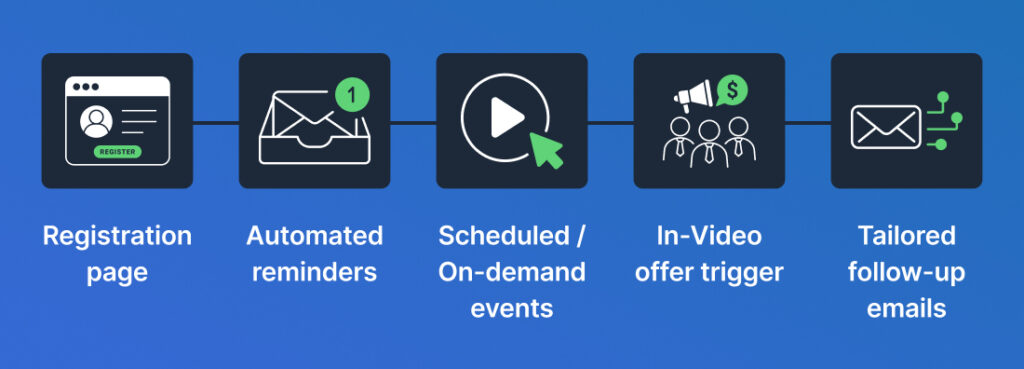
A basic evergreen webinar sequence looks like this:
- A visitor lands on a registration page.
- The page promises a specific outcome or learning moment.
- The visitor chooses a session time, joins through Just-in-Time access, or watches through an on-demand option.
- The system sends confirmation and reminder messages.
- The recorded presentation plays at the chosen time.
- Timed elements such as messages, polls, handouts, or offers appear during the session.
- The attendee receives replay access if enabled.
- Follow-up messages continue based on the intended next step.
That sequence shows what an evergreen webinar actually is. It is not only the recording.
If you only automate the video, you have a video page. If you automate the decision path around the video, you have an automated webinar funnel. That distinction is where the “record once, sell without going live” outcome comes from.
The funnel includes the reason someone registers, the timing of the session, the reminders that bring them back, the offer moment, the replay rules, and the messages that follow. The recording is one part of the system. The system is what sells.
How is an evergreen webinar different from a live webinar?
A live webinar happens in real time with a presenter actively delivering the session. An evergreen webinar uses recorded content and repeats the session through automation.
Live webinars are better when the audience needs real-time teaching, open Q&A, current information, or the presenter’s presence to make the session valuable. Evergreen webinars are better when the teaching can be standardized and the message is stable enough to repeat.
This is where people get the format wrong. They treat evergreen as a replacement for live. It is not always that. Often, it is what comes after live.
The most practical path is to run the presentation live first. Learn what questions people ask. Improve the pacing. Clarify the offer. Then automate the version that holds up on its own.
The goal for the automated session is not to pretend the host is live. It is to make the session feel intentional: clear start time, clean transitions, relevant prompts, and an offer that appears after the teaching has earned it.
What should an evergreen webinar include?
An evergreen webinar should include a clear registration promise, a recorded presentation, an access model, reminders, timed engagement, a relevant offer or next step, replay logic, and follow-up. Leave one of those pieces vague and the webinar feels like an isolated video instead of a guided event.
The registration promise does more work in an evergreen setup than most people expect. There is no live presenter relationship to lean on. The page has to make the session feel worth scheduling.
The presentation should be edited for automated delivery. Remove live-only moments that make no sense later. Cut rambling introductions. Replace “drop your questions in the chat and I’ll answer them in a minute” with a cleaner transition unless a moderator will actually be there to respond.
Timed engagement should support the teaching. A poll should reveal intent or segmentation. A handout should help the viewer apply the idea. A timed offer should appear after the viewer understands the problem, the mechanism, and the next step.
Too many automated prompts are worse than too few. They make the session feel staged rather than valuable.
What scheduling options can an evergreen webinar use?
An evergreen webinar can run as a scheduled session, a recurring session, a Just-in-Time session, an on-demand session, or a replay-style experience. The right choice depends on how urgently the audience wants the information and how much commitment the offer needs.
Scheduled sessions feel more like an event. They work well when the topic has enough perceived value that people are willing to come back at a set time.
Just-in-Time access reduces the gap between interest and attendance. That can work well for high-intent traffic because the visitor does not have to wait. It can also backfire if the topic feels casual. When everything is instantly available, viewers sometimes treat it as less important.
An on-demand webinar fits education-heavy content, onboarding, and prospects who need information immediately. It is usually weaker when the entire sales argument depends on a sense of occasion.
Replay access gives people a second path into the material. It should not be used as a patch for a weak session. If the presentation does not earn attention the first time, replay access will not fix it. But for people who missed the session or want to revisit specific sections, it can extend the reach of a strong webinar.
What do you need before building an evergreen webinar?
An evergreen webinar needs more than a recording. Before you build one, you need a stable topic, a clear audience, a presentation worth repeating, a relevant offer, and a follow-up plan.
This is where most people spend money too early. They choose software before they know whether the webinar deserves automation. That order is backwards.
Start with the message.
The topic should solve a problem your audience already recognizes. The registration promise should be specific enough that someone knows why they should attend now, not someday. The presentation should move from problem to method to next step without depending on live improvisation. The offer should feel like a natural continuation of the teaching, not a commercial interruption.
You also need a plan for what happens after the session. Someone who registers and misses the webinar needs a different follow-up than someone who watches the offer and clicks. Someone who watches a replay may need a different reminder than someone who left halfway through. If every person gets the same follow-up, the funnel is not really using the advantage of automation.
The minimum viable setup is simple:
- A topic people already care about
- A recorded presentation that can stand on its own
- A registration page with a specific promise
- A schedule or access model
- Reminder messages
- A timed offer or next step
- Replay rules
- Follow-up after the session
- A plan to review behavior and improve one part at a time
Do not build the most elaborate version first. Build the cleanest version that can show you whether the message holds up without you in the room.
Are evergreen webinars effective?
Evergreen webinars can be effective when the topic is specific, the presentation is repeatable, the offer fits the audience, and the follow-up is planned. They are not effective simply because they run automatically.
The format is strongest when the viewer needs education before taking the next step. A sales page can explain features. A webinar can teach the problem, show the cost of staying stuck, introduce a method, handle objections, and make the next step feel logical.
But automation magnifies both strengths and weaknesses.
A clear webinar becomes a repeatable sales or education system. A vague webinar becomes a vague webinar that runs more often.
Evergreen webinars are usually a poor fit when the offer requires heavy customization, the audience needs live diagnosis, the topic changes constantly, or trust depends on direct presenter interaction. In those cases, a live webinar, sales call, or hybrid setup may be better.
What does setup effort actually look like?
Setting up an evergreen webinar takes more effort than uploading a recording, but less effort than hosting the same live session every week indefinitely. The right comparison is not easy versus hard. It is front-loaded versus repeated.
The first build takes focused attention. You need to decide what the webinar promises, how long the presentation should be, when the offer appears, what happens if someone misses it, and how follow-up should change based on behavior.
A sensible setup plan:
- Start with the strongest existing presentation or record a clean version.
- Remove live-only references that will age badly.
- Write a registration page around one specific promise.
- Choose the access model: scheduled, recurring, Just-in-Time, on-demand, or replay.
- Add reminders that restate why the session matters.
- Place the offer only after the teaching has earned it.
- Create follow-up paths for attendees, no-shows, early exits, and replay viewers where your tools support that distinction.
- Test the full path on desktop and mobile before sending real traffic.
One note on naming: a specific title almost always beats a grand one. It gives the viewer a concrete reason to attend now rather than saving it for later.
Worked example: turning a course launch webinar into an evergreen webinar
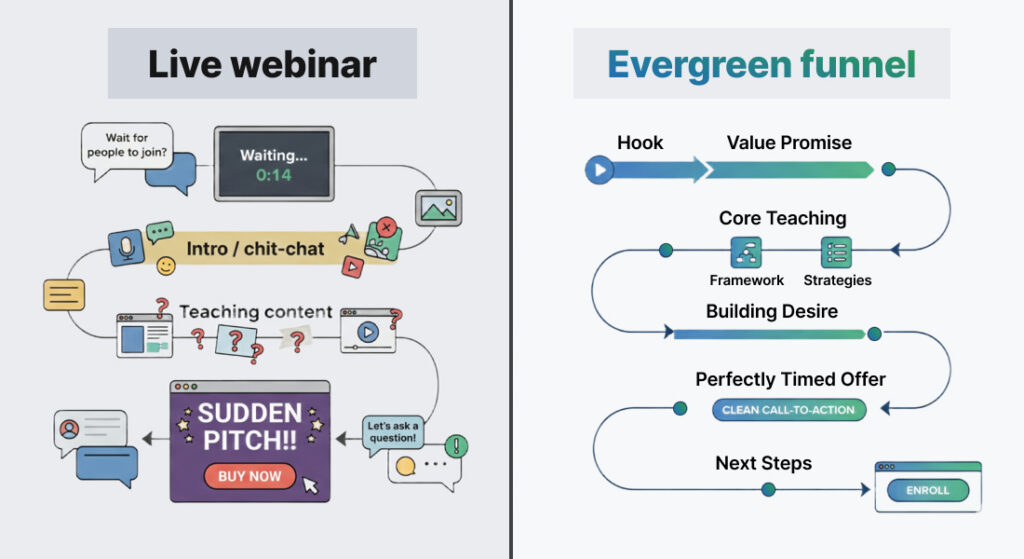
A course creator has run the same live training three times. The topic is “How to build a repeatable client acquisition plan without posting every day.” The course offer is stable. The audience asks similar questions each time. That is a strong candidate for evergreen delivery.
The creator should not upload the raw live recording as-is.
Edit the opening. Any “we’re waiting for people to join” section goes. The first few minutes should confirm the promise, name who the session is for, and explain what the attendee will be able to decide by the end.
Clean up the chat references. If the original says “tell me in the chat where you’re from,” replace it with something that works in an automated context: “As you watch, pay attention to which of these three problems is costing you the most leads.”
Choose the schedule deliberately. High-intent email traffic may warrant Just-in-Time access because subscribers already know the creator. Colder traffic sources may benefit from scheduled sessions that create more perceived commitment.
Time the offer after the teaching. The pitch should not feel like a surprise. It should feel like the natural next step for someone who wants help implementing the method.
Here is what the difference looks like in practice:
Registration headline before:
“Free training: how to get more clients”
Registration headline after:
“How to build a repeatable client acquisition plan without posting every day — training for independent consultants”
The second version names the method and the audience. Someone landing on that page knows immediately whether it is for them.
Reminder subject line before:
“Your webinar starts soon”
Reminder subject line after:
“Before your session tomorrow — the one shift that makes client acquisition repeatable”
The second version restates the promise and gives someone a reason to show up even if they half-forgot why they registered.
Offer timing before:
The offer appears early, before the teaching has built enough context.
Offer timing after:
The offer appears after the framework has been taught and the implementation gap has been named.
The timing is not arbitrary. The offer should arrive when the viewer understands the problem, has seen the method, and can feel the gap between knowing and doing. That is when the course becomes the obvious next step, not a pitch bolted onto the end.
After real traffic has gone through the webinar, review actual behavior. Where do people register? Where do they leave? Do they reach the offer? Do replay viewers behave differently? None of these changes require rebuilding the webinar. They require reviewing what the funnel is actually saying at each step and asking whether it earns the next click.
What mistakes make evergreen webinars fail?
Automating too early. A webinar that has not been tested live, reviewed carefully, or tightened around a clear offer will not improve because it runs more often. Validate the message before you automate it.
Treating every automated element as a trust signal. Timed chat, attendee counts, polls, and offers can make the session feel more event-based when used carefully. Used carelessly, they make the experience feel manufactured and erode the trust the content was building.
Using replay as a safety net. Replay access helps people who missed the session or need to revisit the content. It does not rescue a weak presentation. If the main session is not earning attention, the replay will not fix it.
Sending the same follow-up to everyone. Someone who registered and never attended is not in the same position as someone who watched the offer and clicked. The follow-up should reflect what the person did when your tools and data support that distinction.
Abandoning the webinar after launch. Evergreen does not mean untouched. Review the registration promise, reminder messages, attendance behavior, drop-off points, offer timing, replay behavior, and questions that come in. Then test one meaningful change at a time.
Most automation advice underestimates maintenance. That is why so many evergreen funnels slowly decay after a strong start.
When should you use an evergreen webinar?
Use an evergreen webinar when your presentation can be standardized, the topic stays relevant, the offer is clear, and the audience benefits from guided education before taking the next step. When those conditions are met, evergreen delivery can turn a single strong presentation into a repeatable sales asset.
Do not build one just because you are tired of going live. That may be a valid motivation, but it is not sufficient on its own. The webinar still has to earn the click, the attention, and the next step every time it runs.
An evergreen webinar is a strong fit when the audience has a repeatable problem, the offer naturally follows the teaching, the presentation does not require constant live adjustment, and you have a plan for traffic and follow-up.
It is a weak fit when the content changes often, the offer is still being tested, the audience expects a live workshop, or the buying decision depends on personal interaction from the presenter.
For teams ready to automate a validated presentation, EverWebinar is built for automated webinar delivery with scheduled and Just-in-Time access, timed interactions, offer reveals, replay logic, and analytics. The platform does not fix a weak presentation. It helps a strong one run without requiring the presenter to go live every time.
Evergreen webinar decision checklist
Before building, answer these honestly.
| Decision question | Good sign | Warning sign |
| Is the topic stable? | The same problem comes up repeatedly. | The topic changes every time you present. |
| Is the offer clear? | The webinar naturally leads to one next step. | You are still testing what to sell. |
| Does the session need live teaching? | Questions are predictable or handled later. | The value depends on real-time feedback. |
| Is the registration promise specific? | The audience knows what they will learn or decide. | The title sounds broad or motivational. |
| Is follow-up planned? | Attendees, no-shows, and replay viewers have different paths. | Everyone gets the same generic email. |
| Will you maintain it? | You plan to review behavior and improve one thing at a time. | You expect it to run untouched forever. |
A simple rule: automate the repeatable parts. Keep human judgment where the message still needs work.
FAQ
How much does an evergreen webinar cost?
An evergreen webinar usually has two costs: the platform used to run it and the work required to build the presentation, registration page, offer timing, reminders, replay, and follow-up. Software pricing is the easier number to compare, but it is not the whole cost. The bigger investment is often creating a presentation worth automating. Check EverWebinar’s pricing here.
Are evergreen webinars effective?
Evergreen webinars can be effective when the topic is specific, the presentation is repeatable, the offer fits the audience, and the follow-up is planned. The format works best when the viewer needs guided education before making a decision. It underperforms when the offer is still being tested, the audience expects real-time teaching, or the business treats the recording as the whole funnel rather than one part of a system.
What is the difference between evergreen and automated webinars?
An automated webinar is any webinar delivered through automation instead of live presentation. An evergreen webinar is a specific type of automated webinar designed to stay relevant and run repeatedly over time. In everyday use, people often use the terms interchangeably, but the practical difference matters when you are choosing tools, schedules, replay rules, and follow-up paths.
Should I disclose that an evergreen webinar is recorded?
You should avoid misleading attendees. The most defensible approach is to position the session honestly as on-demand training, a scheduled automated replay, or a guided video session without implying a live presenter is delivering it in real time. The weaker long-term strategy is building a funnel that depends on attendees not knowing what they are watching.
Can an evergreen webinar replace a live webinar?
Sometimes, but not always. An evergreen webinar can replace repeatable live presentations when the message is stable, the audience does not need real-time teaching, and the offer does not depend on personal interaction. It should not replace live sessions involving open Q&A on unpredictable topics, coaching, troubleshooting, or sales conversations that require real-time diagnosis.
Final takeaway
An evergreen webinar is a repeatable automated event built around a recorded presentation. The “record once, sell without going live” promise belongs to businesses that build the full system, not just the recording.
Build it after the message is clear. Keep the registration promise specific. Use scheduling deliberately. Add interaction only when it supports the session. Review performance after launch and improve one thing at a time.
Do that, and an evergreen webinar can become a presentation that sells without requiring you to host it live every time. Skip those parts, and it is just another recorded video asking for attention.