



On-demand webinars have one feature everybody loves and one problem almost nobody talks about.
The feature is obvious. Your viewer presses play whenever they want, with no waiting and no appointment to miss.
The problem is the same feature. Watch-anytime means there’s never a reason to watch now, and a viewer with no reason to watch now says “I’ll get to it later,” then doesn’t.
That’s the whole simulated live vs on-demand debate in one line.
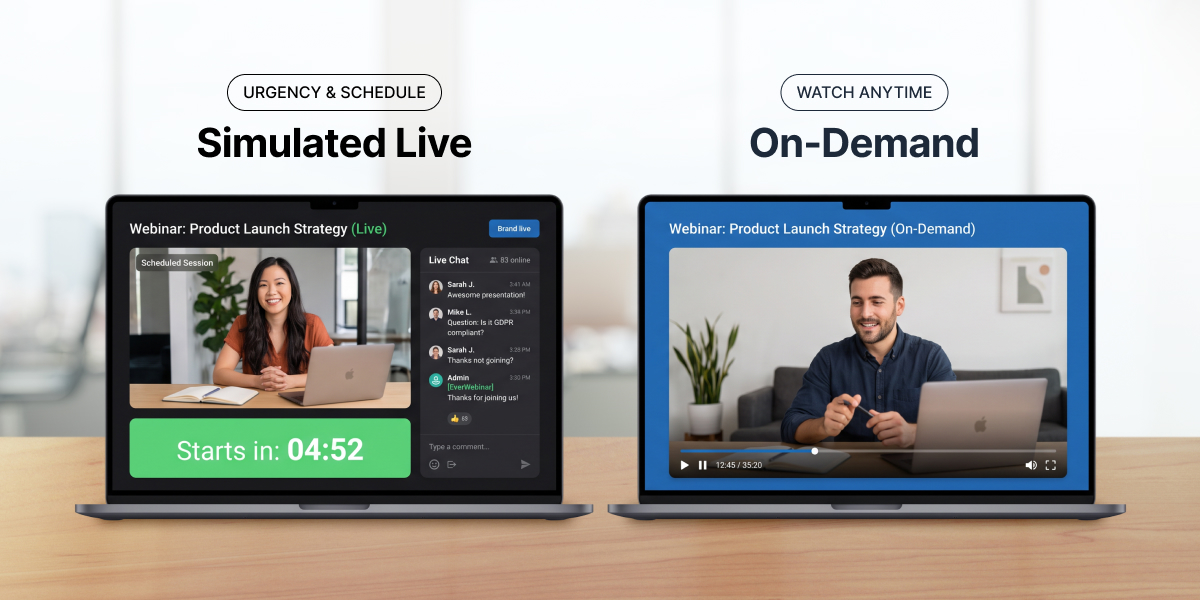
A simulated live webinar is the same pre-recorded presentation, but it plays at a scheduled time, which brings back the one thing on-demand throws away: a deadline.
Below is how the two webinar formats compare on urgency and trust, where the urgency actually comes from, and how to set one up without losing your audience’s trust.
This assumes you already have a recorded presentation that converts. Whether to automate at all is a separate decision.
Table of Contents
What is a simulated live webinar?
A simulated live webinar is pre-recorded video that plays at a scheduled time, with timed interaction layered on top, such as polls, quizzes, chat and CTAs, depending on the platform. Everyone registered for the 2 p.m. session watches the same pre-recorded content, starting together at 2 p.m.
It sits between the other two webinar formats:
Over one day, a live presentation runs once, at 2 p.m. A simulated live recording starts at fixed times, 10 a.m., 2 p.m. and 7 p.m., for everyone in each session. On-demand viewers each start whenever they press play.
Live presentation
You present in real time, once.
Simulated live
A recording starts at a fixed time for everyone in that session.
On-demand
A recording starts the moment someone presses play.
One naming collision worth clearing up early. Simulated live isn’t the same as hybrid events, which mix an in-person audience with a virtual one. It isn’t a full virtual event platform either. It’s a single pre-recorded webinar running on a schedule.
Why “simulive” means two different things
The industry doesn’t agree on what the term means, which makes comparing one webinar platform against another confusing.
Recording + real chat
Some platforms define simulated live webinars strictly as pre-recorded video plus real chat. Moderators from your team sit in the room answering questions as they arrive, and the only thing simulated is the presenter’s delivery.
Lower trust risk
Recording + simulated activity
Others use it to mean a recording with simulated activity: chat simulation that rolls messages in at set timestamps, a running attendee count, polls that fire on cue. The room feels busy whether or not anyone is typing.
Higher trust risk
Both are real products with very different trust risks. When a vendor calls simulive honest or deceptive, check which version they mean before you take a side.
Urgency actually comes from the schedule, and almost nothing else.
People get this backwards. They assume the busy-looking room creates urgency, so they pile on simulated activity. The real drivers are three things a scheduled time gives you.
-
Commitment
Someone who booked the 2 p.m. session has already said yes once. Someone who bookmarked an on-demand link hasn’t said yes to anything.
-
Momentum
A scheduled session plays straight through. No pausing for lunch, no skipping ahead to the pricing.
-
A deadline that’s actually true
This is the big one. Tie the offer window to the session and it closes at a specific time for a specific person. That’s urgency that holds up, because nothing about it is invented. It’s also the biggest single difference in simulated live vs on-demand. On-demand can’t create this naturally. With no start time, any deadline gets bolted on afterward, and viewers can tell.
EverWebinar’s own approach to simulated live webinars rests on those three drivers: commitment, momentum and session-based deadlines. It’s also why Adobe Connect defines the format by its scheduled start rather than its chat.
On urgency
Simulated live wins clearly.
Simulated live
On-demand
On attendance
On-demand wins.
Simulated live
On-demand
Nobody falls through a gap between registering and watching.
That’s the real trade.
Simulated live vs on-demand: trust
A plain on-demand automated webinar is about as trustworthy as a format gets. It’s a recording that says it’s a recording.
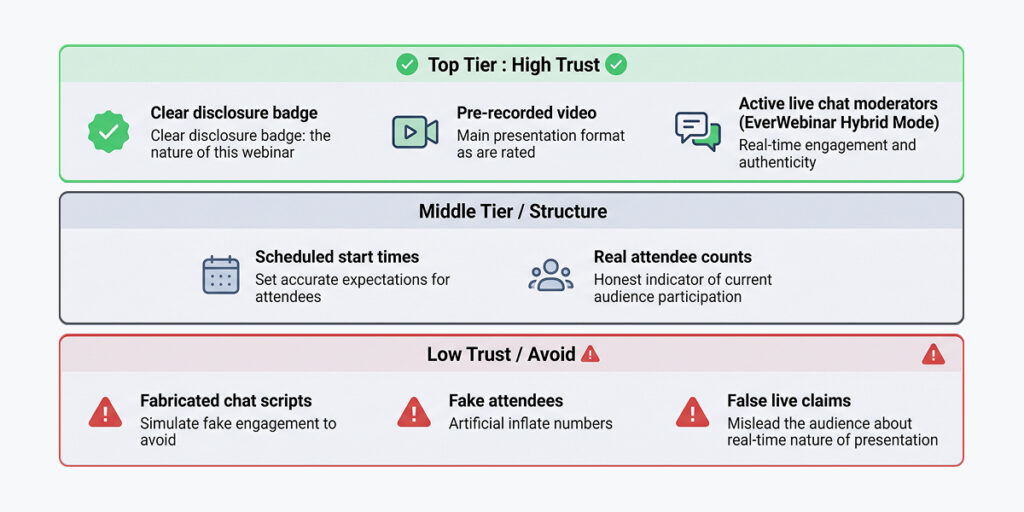
Simulated live can match that, or it can be the least trustworthy option on the list. It depends entirely on what you simulate.
-
Structure
A scheduled start is simply structure. A cinema works the same way. The film was finished months ago, and nobody feels lied to when it starts at 7.
-
A record
Importing chat is different from inventing it. When you bring a live WebinarJam session into EverWebinar with Replica Replay, the chat that replays is what real attendees asked. That’s a record rather than a script.
-
Gray area
Attendee counts are the gray area. They work as social proof, which is exactly why they’re tempting to pad. A count showing how many people are actually watching is information. A count inflated to look busier is a claim that isn’t true.
-
Breaks trust
Simulating people is where trust breaks. Invented attendees, fabricated questions, testimonials from people who aren’t there. The viewers who watch twice will notice, and a screenshot of the same “attendee” asking the same question at the same timestamp travels much further than your webinar ever did.
The cleanest answer is disclosure plus live interaction. WorkCast recommends opening with a short live intro that says the presentation is pre-recorded, then closing with live Q&A. EverWebinar’s hybrid mode covers the second half: the recording plays while moderators answer the chat in real time. Audience engagement stays high, and the interaction is real.
Short live intro
Says the presentation is pre-recorded
Recording plays
Moderators answer the chat in real time (hybrid mode)
Live Q&A
Closes the session
Simulated live vs on-demand at a glance
| Live | Simulated live | On-demand | |
|---|---|---|---|
| Start time | Fixed, once | Fixed, recurring | Whenever they press play |
| Urgency | Highest | High | Lowest |
| Attendance | Lowest | Middle | Highest |
| Trust | Highest | Depends on what you simulate | High |
| Your time per session | The full session | None, or chat only in hybrid mode | None |
| Best for | Launches and testing | Sales presentations | Training and lead generation |
When to use each one
The simulated live vs on-demand choice mostly comes down to one question: does your content depend on timing?
Use simulated live
For a proven sales presentation with a deadline you’ll actually enforce. Course launches, coaching offers and software trials fit well, because the schedule is doing real work there.
Use on-demand
When timing doesn’t matter. Onboarding, training and recorded product demos belong here. On-demand webinars remove the wait entirely, which is what someone needs when they’re stuck on setup right now.
Offer both
For cold traffic. Ad visitors rarely come back for an appointment tomorrow, so give them a session starting in minutes alongside an on-demand option.
Stay live
While you’re still testing, or when the urgency is a real event like a launch. Live streaming and screen sharing that respond to the room also need you there, since pre-recorded content can’t adapt to a question it didn’t anticipate.
How to set up a simulated live webinar
In EverWebinar, build it in this order, since each step depends on the one before.
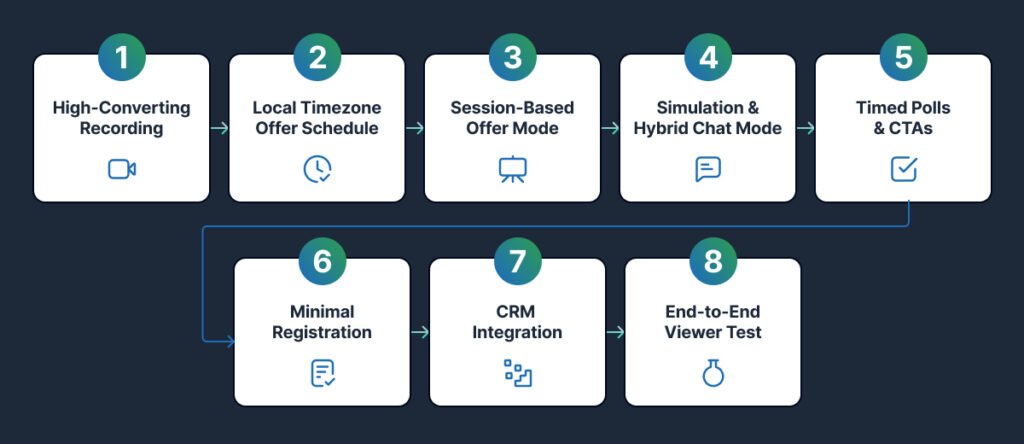
Start with a recording that converts.
Upload an MP4, connect a supported video source, or import a WebinarJam session with Replica Replay. If it isn’t converting live yet, fix that first.
Set the schedule.
Pick recurring times and let the platform show each registrant their local time. Add a just-in-time session for people who won’t wait.
Tie the deadline to the session rather than a calendar date.
This is the step that makes the urgency real, and the one most setups get wrong.
Decide what to simulate.
An attendee count and an open chat window set the room. For real interaction, turn on hybrid mode and staff it with moderators.
Place your polls and CTAs.
Put a poll early so people learn that participation is expected, and time the offer before viewers tend to drop off.
Keep registration forms short and build the reminders.
Name and email is usually enough. Then send a confirmation, a day-before reminder and an hour-before reminder.
Check where the data goes.
If your team runs HubSpot, Salesforce or Marketo, confirm how attendance and watch time reach your CRM before you rely on it. That’s what turns a webinar into lead generation you can act on.
Test it as a viewer.
Register, attend, and confirm every timer and email agrees.
Then watch your conversion rate across the first few sessions. That number, not the attendee count, tells you whether it’s working.
Common questions
What is a simulated live webinar?
A pre-recorded webinar that plays at a scheduled time, with interaction timed to the video. Everyone in a session starts together. That’s the core of simulated live vs on-demand: on-demand begins whenever someone presses play.
How do I set one up?
Start with a presentation that already converts live. Set recurring start times in each registrant’s local time, tie the offer deadline to the individual session, choose how much of the room to simulate, place your polls and offers, then test it as a viewer.
Is a simulated live webinar fake?
Not by definition. A scheduled start and a session-based deadline are real structure. It becomes misleading when you script chat from people who aren’t there or claim you’re presenting live when you aren’t. Hybrid mode, with a real person in the chat, removes the question.
Do simulated live webinars convert as well as live ones?
Usually a little lower per attendee and higher overall, because they run far more often. One EverWebinar customer, Chris H., reported a conversion rate about 10% lower than his live webinar while running five times as many sessions and earning more in total. If you’re still deciding whether to automate at all, start with our guide to live vs automated webinars.