




Table of Contents
Pre-recorded webinars don’t fail because they’re pre-recorded. They fail because they’re treated like videos.
A video says: watch this whenever. A webinar says: here is a guided session with a beginning, a teaching sequence, interaction points, an offer, and a clear next step. When a pre recorded webinar stops behaving like the second thing and starts behaving like the first, people stop treating it like an event. They multitask. They skip ahead. They save the offer for later and never return.
That is the conversion problem. Not the recording. The gap between what the viewer expected and what the experience actually delivered.
At EverWebinar, we see this pattern often: the recording is rarely the only weak point. The schedule, human presence, framing, and offer timing usually decide whether the session feels like an event or a video. Each one has a specific fix. And the right place to start is wherever your funnel is actually losing people — not wherever the slides feel weakest.
Here is how to find that and fix it.
What is a pre-recorded webinar?
A pre-recorded webinar is a recorded presentation delivered through a webinar-style experience rather than a basic video page. It can run on a schedule, repeat at set intervals, start shortly after registration through a Just-in-Time setup, or sit in an on-demand or replay-style session.
That distinction matters because it changes what the viewer expects.
A video page creates no appointment and no commitment. A pre-recorded webinar creates the structure of an event: registration, reminder, a scheduled time, a room, a teaching sequence, an offer, and a follow-up.
That structure is what makes a pre-recorded webinar different from an ungated video — when the structure is actually there.
EverWebinar is built around that structure. Our platform supports automated webinar experiences with registration pages, email reminders, chat simulation, polls, timed offers, and replay delivery. EverWebinar’s public site describes evergreen webinar software as a way to automate pre-recorded presentations so they run like live events, with registration pages, reminders, chat simulation, polls, and timed offers.
But the platform amplifies whatever the webinar already is. A weak message delivered on a strong schedule still delivers a weak message.
Build the experience first. Then automate it.
The Event Gap Test: where the webinar starts losing trust
The most useful question is not “How do we make this feel more live?”
The better question is: Where does the viewer stop feeling attended to?
That is the Event Gap Test. A pre-recorded webinar underperforms when the viewer expected an event but received a video. The gap can open before the session, during the first few minutes, near the offer, or after the webinar ends.
Use these four checkpoints:
| Event Gap checkpoint | What to ask | What usually breaks |
| Before the session | Did the registration page create a real appointment? | The promise is too vague, so the signup is casual |
| At the start | Did the first two minutes prove this is worth watching now? | The opening has biography, housekeeping, or old live-event clutter |
| During the session | Did the webinar feel guided around the viewer’s questions? | The room feels silent, flat, or disconnected |
| After the offer | Did the follow-up match what the viewer actually did? | Everyone gets the same replay or sales email |
This is the core difference between a video and an automated webinar. A video can be useful without caring what the viewer does next. A webinar has to guide attention across a decision.
That is why the first fix is diagnosis.
How to diagnose where your webinar is losing people
Before changing anything, find the leak.
The four failure points below each correspond to a different drop-off point in the funnel. If you fix the wrong one first, you can spend weeks adjusting slides when the real problem is your confirmation email.
Use this as your starting diagnostic:
| What you’re seeing | Likely problem | What to fix first |
| Registrants are not attending | The schedule, confirmation page, reminder sequence, or registration promise is not creating enough commitment | Rework the promise, access model, and reminders |
| Attendees leave early | The opening is weak, slow, or still contains live-event clutter | Tighten the first two minutes, then the first 10 minutes |
| People watch but do not click | The offer appears too early, too late, or without enough context | Fix the offer bridge, CTA timing, and objection handling |
| People click but do not buy, book, or apply | The issue may be outside the webinar | Review the sales page, checkout flow, application, offer fit, or sales process |
Most failing pre-recorded webinars have one dominant leak. Find it before you change anything else.
Reason 1: Your pre-recorded webinar feels like a passive video
The most common version of this problem looks like this: a creator records a presentation, adds it to a registration page, and sends traffic. People register but don’t attend. People attend but leave early. The creator assumes the content is the problem and re-records the whole thing.
The content may not be the problem.
What is missing is the structure that tells the viewer this is worth treating like an event. That structure includes a specific registration promise, an access model matched to the audience, reminder emails that resell the value of attending, and a webinar room that feels guided from the moment someone joins.
“Free webinar on email marketing” earns a casual signup.
“See the three-email sequence designed to recover abandoned carts without relying only on another discount” earns a clearer appointment because the viewer knows what they are coming to learn.
That difference matters. The first promise sells a topic. The second promise sells a reason to show up.
Fix the access model before you fix the slides
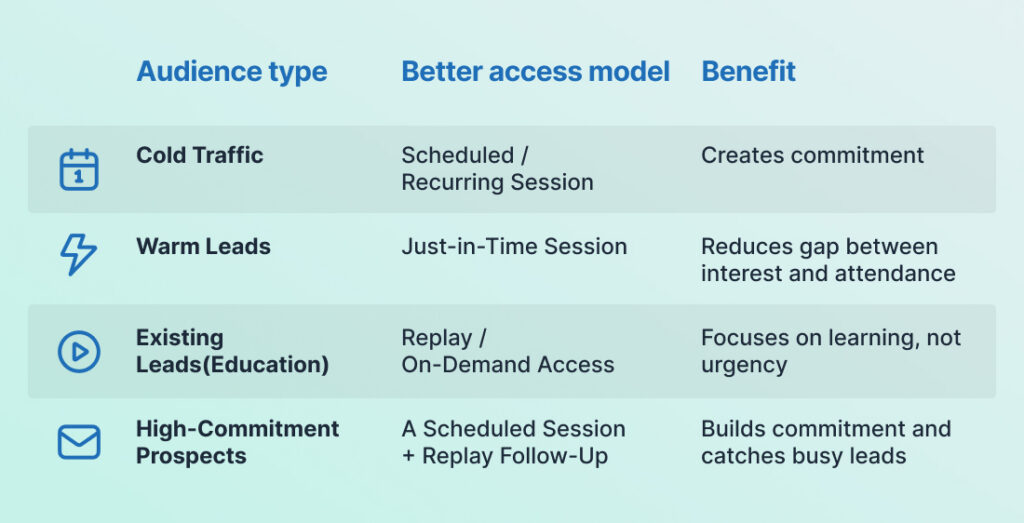
The schedule should match the viewer’s intent.
Cold traffic often needs a scheduled session because the appointment creates commitment. Warm leads who are actively researching may prefer a Just-in-Time session that starts soon. Existing customers doing onboarding may need on-demand access because the job is learning, not creating sales momentum.
Use this to match your access model to your audience:
| Audience type | Better access model | Why it works |
| Cold or mildly curious traffic | Scheduled or recurring session | The appointment creates commitment that a video link does not |
| Warm leads actively comparing options | Just-in-Time or near-term session | They are ready now, so reduce the gap between interest and attendance |
| Existing leads who need education | Replay or on-demand access | The job is learning, not sales urgency |
| Prospects considering a higher-commitment offer | Scheduled session with replay follow-up | The session builds commitment, while replay catches people who were interested but not ready |
Our automated webinar software is designed to run pre-recorded webinars on a schedule or Just-in-Time, with registration, reminders, delivery, session insights, and follow-up without the presenter needing to be live each time. EverWebinar’s automated webinar page describes global scheduling, reminder flows, and session insights for always-on webinar delivery.
That repeatability is only useful when the structure around the recording is strong.
A pre-recorded webinar should be easier to attend. It should not be easier to ignore.
Reason 2: There is no believable human presence
A silent webinar room creates doubt.
Even when the presentation is strong, viewers notice when nothing is happening around them. No questions. No visible momentum. No sign that the session was built around real people with real concerns. The recording starts to feel archived rather than curated.
The instinct is to make the webinar “feel live.” That phrase usually leads people in the wrong direction. A pre-recorded webinar does not need to imply the presenter is on the other side of the screen. It needs to feel attended to.
That is the more useful standard.
A session feels attended to when the interaction reflects the viewer’s internal conversation. When the presenter explains the core problem, a timed chat message can surface the objection the viewer is already thinking. When the presenter introduces the method, a poll can help viewers identify where they are stuck. When the offer approaches, a chat question can address the most common reason qualified viewers hesitate.
Interaction used this way is pacing, not decoration.
Fix chat simulation by writing questions, not applause
Chat simulation done wrong looks like this:
“This is so valuable!”
“Best training I’ve ever seen!”
“You’re amazing, thank you!”
Those messages create noise. They do not answer anything and they do not help the viewer move forward.
Chat simulation done right looks like this:
“Would this approach work for a smaller list?”
“Should I set up the scheduled sessions before I finalize the offer page?”
“What if I already have a recording but the CTA section feels weak?”
Those messages make the webinar feel more relevant because they are the questions the viewer may already be sitting with.
Map your chat simulation to the arc of the presentation:
During the opening, reflect the core pain point back at the viewer.
During the teaching, clarify the method and surface common sticking points.
Near the offer, address the most common objections: eligibility, fit, timing, and what happens next.
Our simulated live webinar tools are built for this kind of guided experience, including scheduled chat messages that can appear at specific timestamps in a session. The page describes timed chat, real urgency, event pacing, and the ability to schedule chat messages in advance so they appear automatically during each session.
The goal is not to make the room look busy. The goal is to make the session feel like it was built around the viewer — because it was.
One note on restraint: live-like signals only help when the presentation underneath them is strong. Chat simulation on a weak webinar just creates a busier version of the same problem.
Fix the content arc first. Then layer in the interaction.
Reason 3: You’re framing the recording like a downgrade
Many pre-recorded webinars begin by apologizing for themselves.
“This is just a replay, but there’s still a lot of value here.”
That sentence tells the viewer they are getting the lesser version before the first teaching point lands. It lowers perceived value in the first thirty seconds, and the presentation spends the rest of its time trying to recover ground it gave away voluntarily.
The fix is not to hide the format. The fix is to frame it accurately — which turns out to be a much stronger position than apologizing for it.
A well-framed automated webinar is a benefit. The viewer gets a focused, repeatable session without waiting for the next live date. They get the clearest version of the teaching, without the rough edges of a live delivery. They get a structured path through the idea at a time that works for them.
That is not a downgrade. Frame it that way.
A better opening sounds like this:
“This is a scheduled automated training, which means you get the full session without waiting for our next live event. During this training, you’ll see the framework, a practical example, and the next step if you want help implementing it.”
That does three things. It sets accurate expectations. It explains why the format exists. It tells the viewer what to watch for.
That is a much stronger opening than “sorry this isn’t live.”
Use the Two-Minute Trust Test
Before publishing the automated version, watch only the first two minutes and ask four blunt questions:
- Would a new viewer know exactly why they should stay?
- Does the presenter get to the promise quickly?
- Is there anything that only made sense during the original live event?
- Does the opening make the automated format feel intentional, or does it apologize for it?
If the first two minutes do not pass, fix them before editing the rest of the webinar.
The opening carries more weight in a pre-recorded webinar because the viewer is quietly checking whether this is worth treating like an event. If the session starts with old housekeeping, delayed context, or a soft apology, the viewer has already been trained to disengage.
The registration page is where this framing begins
The page should not sell “a free webinar.” It should sell the outcome of attending.
Weak:
“Join our free webinar on building an online course.”
Stronger:
“See the five-part outline that turns specialized knowledge into a sellable first course — including the validation step many creators skip before recording lessons.”
The second version is specific. It tells the reader what problem gets solved. It also prepares them for an automated format, so the recording does not feel like a bait-and-switch when they arrive.
For a SaaS company:
“Watch a guided demo that shows how to configure automated onboarding for users who never complete setup.”
For a consultant:
“See the education sequence that helps prospects understand your methodology before they book a discovery call.”
For an agency:
“Use this audit framework to find where an automated webinar funnel is losing qualified leads at the offer stage.”
The promise on the registration page should match the webinar exactly. If the page promises a specific tactical fix and the first eight minutes are biography, backstory, and live housekeeping, the viewer feels the mismatch.
And they should, because the mismatch is real.
Edit the recording for the automated context
A pre-recorded webinar should not preserve every live moment. It should preserve the moments that help the current viewer understand, trust, and act.
Remove or reframe anything that only made sense the day it was recorded:
- Opening calls to the live audience by name
- Date-specific launch or bonus references
- Questions about audio and technical setup
- Dead air from live transitions
- Jokes about being on camera for the first time
- Q&A segments that reference questions no current viewer asked
- Urgency that was real during a live launch and is no longer true
Do not over-polish. Some human texture helps. A natural pause, a conversational aside, a moment where the presenter thinks through an idea out loud — these make the presentation feel like a person talking, not an ad.
The goal is not sterile. The goal is to remove content that signals to the viewer that this session was built for someone else.
Reason 4: Your urgency is missing, fake, or badly timed
A pre-recorded webinar needs a reason to act now. Without one, viewers can enjoy the content, find it useful, and still do nothing because nothing in the experience told them that waiting had a cost.
But urgency is also where automated webinars get sloppy in ways that damage trust.
Some have no urgency at all. The offer appears, the viewer thinks “maybe later,” and the moment closes.
Others use pressure that does not connect to the actual offer: a countdown timer with no explanation of what expires, scarcity language that does not match anything real, or dramatic claims that feel disconnected from the specific decision the viewer is weighing.
Neither works. The first loses the sale by default. The second loses trust first and then loses the sale.
The fix is to connect urgency to the viewer’s real decision point — and that varies by offer type.
If the offer is a course with cohort-based implementation, urgency may come from a real enrollment window or kickoff date.
If the offer is a consultation or strategy session, urgency may come from acting while the problem is fresh and the viewer’s context is loaded.
If the offer is software or a tool, urgency may come from preserving momentum. The viewer just spent time understanding a process. Starting setup while that mental model is active can be more useful than returning to it cold later.
All of these are honest. All of them answer the actual question the viewer has at the offer moment: “Why now, specifically?”
Fix the timing of the offer
The offer should appear after the viewer understands three things:
- What problem they are solving
- What approach you recommend
- Why the next step helps them apply it
If the CTA appears before those ideas are established, it feels like a pitch. If it appears too late, many viewers may have already closed the tab.
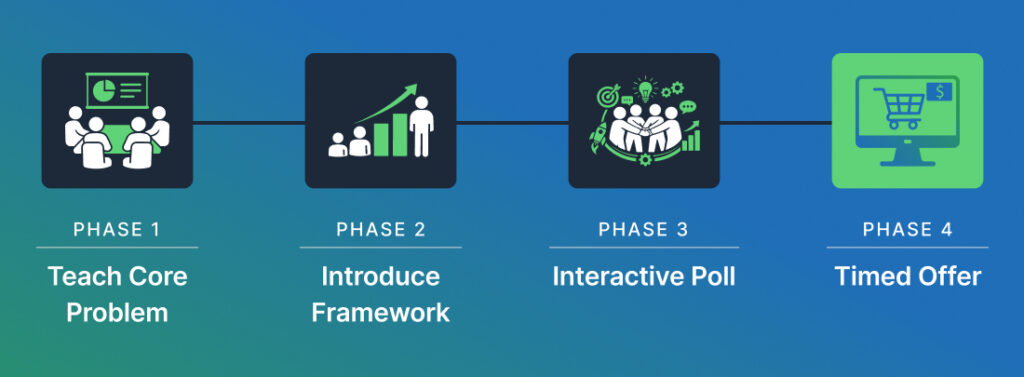
The sequence that earns the offer looks like this:
First, teach the core problem clearly enough that the viewer feels it.
Then introduce the mechanism or framework — the specific approach that makes your method different from what they have already tried.
Then use a poll or timed chat prompt to let the viewer locate themselves in the problem. This is the moment that makes the offer feel relevant rather than generic.
Then introduce the offer as the natural next step for someone in that situation.
Then use the replay and follow-up sequence to re-engage people who were interested but not ready.
EverWebinar supports timed offers, so the CTA can appear at a specific point in the presentation rather than sitting on screen the entire time. EverWebinar’s public site describes timed offers, polls, chat simulation, and dynamic attendee counts as part of the evergreen webinar experience.
The practical value is not the button appearing. It is that the offer appears when the viewer is actually prepared to evaluate it.
Fix the follow-up
Replay access is useful. It should not be a dumping ground for everyone who did not convert.
Segment the follow-up by what the viewer actually did.
People who registered but never attended need a re-entry point with a reason to come back — not just a reminder that a replay exists.
People who dropped off early need a message that points them back to the section they missed, ideally the teaching section right before the offer.
People who watched the offer but did not click need objection handling: a short email or follow-up sequence that answers the most common reasons someone in their situation may hesitate.
People who clicked but did not buy, book, or apply may need a different page, a clearer offer, a lower-commitment first step, or direct sales follow-up.
Our webinar marketing resources frame webinar marketing as a full funnel that includes registration, attendance, engagement, the offer, and follow-up. The page also notes that attendees and no-shows need different follow-up paths because they have different levels of context.
The follow-up should reflect that.
Worked example: a course creator fixes a failing automated webinar
A course creator has a recorded webinar called “How to Build Your First Online Course.”
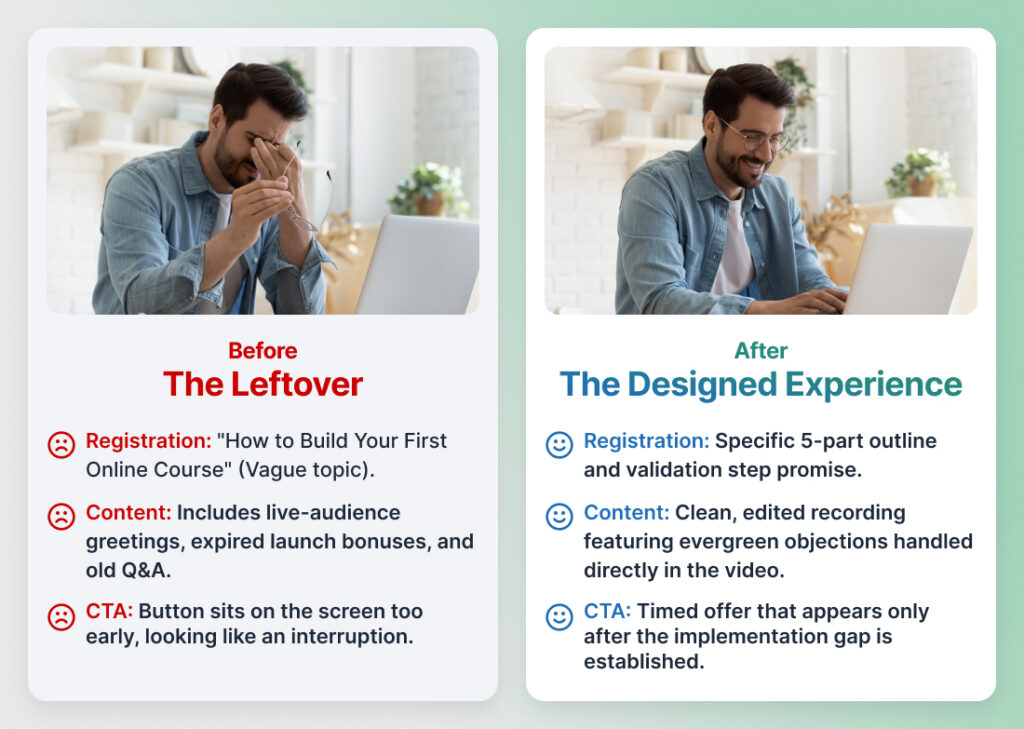
The content came from a live launch. The teaching is useful. The automated version is running, but the offer is not getting enough qualified action.
Here is where the funnel is actually breaking.
The registration promise is too broad. “How to Build Your First Online Course” could mean curriculum design, video recording, pricing, platform selection, or finding students. It creates a vague appointment, which produces vague commitment, which produces lower attendance and earlier drop-off.
The fix:
“See the five-part outline that turns your expertise into a course someone is more likely to understand and want — including the validation step to complete before recording lessons.”
Now the viewer knows what they are coming to learn, who it is for, and what specific mistake it helps them avoid.
Next, the creator segments access by audience. Cold traffic from paid ads gets scheduled sessions. The appointment creates commitment that a replay link does not. Email subscribers who already know the creator get Just-in-Time access because they are ready to engage now. People who missed the session get a replay follow-up that links directly to the core framework section, not the beginning of the recording.
Then the creator edits the recording.
They remove the live audience greetings, the launch-date bonus reference, and a Q&A section where the presenter takes questions from people who are not there anymore. In place of the Q&A, they add three evergreen objections handled directly by the presenter:
“Will this work if I have a small audience?”
“Should I sell the course before I finish recording all the lessons?”
“What if I have more than one course idea and I’m not sure which to build first?”
Those questions exist in the presentation now, not in a live chat no current viewer can see.
Then the creator adds chat simulation timed to the arc of the presentation. At the moment the presenter discusses validation, a message appears asking about small audiences. When the presenter explains what is included in the offer, a message asks whether templates are included.
The chat now reflects what the viewer is wondering, not what a different live audience wondered months ago.
Finally, the creator fixes the offer timing.
The CTA no longer appears early and sits there for the rest of the session. It appears after the presenter has walked through the outline, explained the validation step, and named the implementation gap the offer closes. The button is no longer an interruption. It is the logical next step.
Nothing about this required pretending the session was live. It required treating the automated version as its own designed experience rather than a leftover from the live event.
Where EverWebinar fits in this
EverWebinar is the right tool when the presentation is stable and repeatable and the business needs a structured automated experience around it.
That includes scheduled, recurring, or Just-in-Time delivery; registration pages and reminder sequences; chat simulation and timed chat messages; polls and timed offers; replay-style access; session-level analytics; and follow-up planning based on attendee behavior.
If the presentation is not stable yet — if the offer is still being tested, the audience is not defined, or the message changes frequently — automation can scale those problems. Get the live version working first. Record it. Then automate the experience around it.
If the presentation is already working in a live context and you want to make it repeatable without hosting it manually every time, that is what EverWebinar’s evergreen webinar software can support that automated delivery model.
FAQ
Why don’t pre-recorded webinars convert?
Pre-recorded webinars most often fail at one of four points: the schedule does not create enough commitment to drive attendance, there is no believable human presence during the session, the format is framed as a lesser alternative rather than a designed experience, or the offer appears without enough context or urgency.
The recording itself is rarely the only problem. The structure around it usually is.
How do I make a pre-recorded webinar feel live?
Give it the structure of an event: a specific schedule, a reminder sequence that resells the reason to attend, timed chat messages that reflect the viewer’s actual questions, polls that help viewers locate themselves in the problem, and an offer that appears at the right moment in the presentation arc.
The goal is not to imply the presenter is currently on screen. The goal is to make the session feel actively guided. EverWebinar supports this through chat simulation, polls, timed offers, scheduled and Just-in-Time delivery, and webinar follow-up planning.
Should I tell viewers the webinar is pre-recorded?
Set accurate expectations. You do not need to apologize for the format. Frame it as what it actually is: a scheduled automated training, an evergreen session, a guided replay, or an on-demand webinar experience.
A useful framing line is:
“This is a scheduled automated training, which means you get the full session without waiting for our next live event.”
That sets expectations, explains the format, and positions it as a benefit rather than a limitation.
Is a pre-recorded webinar better than a live webinar?
A pre-recorded webinar is the better choice when the presentation is stable, the message does not change frequently, and the business needs to deliver the session repeatedly without the presenter being live each time.
A live webinar is the better choice when the session depends on real-time teaching, live Q&A, or an audience where live presence meaningfully changes the experience.
EverWebinar is built for automated and evergreen delivery. WebinarJam is built for live hosting.
What should I fix first if my pre-recorded webinar isn’t converting?
Fix the biggest leak first.
If registrants are not attending, start with the registration promise, confirmation page, schedule, and reminder sequence. If attendees leave early, fix the opening and remove live-only content that signals the session was not built for the current viewer. If people watch but do not click, fix the offer bridge and CTA timing. If people click but do not convert, the problem is likely outside the webinar — on the sales page, in the checkout flow, or in the offer itself.
Identify which stage is losing people before you change anything. The wrong fix wastes weeks.
Final note
A pre-recorded webinar can work when it is treated as a designed automated experience rather than a leftover from a live event.
The most common fix is not making the webinar look more live. It is making it feel more attended to: the right schedule for the audience, chat simulation that reflects real viewer questions, framing that positions the automated format clearly, an offer that appears after the viewer understands the problem and next step, and follow-up logic that reflects what each viewer actually did.
If your presentation is already clear and repeatable, EverWebinar can help turn it into a structured evergreen session with registration, reminders, live-like engagement, timed offers, replay access, and analytics.
Fix the experience. Then automate it.