



Table of Contents
If you’ve got a live webinar that’s making sales, you shouldn’t have to keep running it manually just to keep the momentum going.
Hosting webinars live is incredible for driving sales, but running that entire routine over and over will burn you out fast. An evergreen webinar funnel lets you take a presentation that already works and keep it going without having to show up every time.
But it takes more than just uploading a recording. You still need people to sign up, show up, watch the pitch, and buy.
Here’s how to set up an evergreen webinar funnel that actually delivers.
What Is an Evergreen Webinar Funnel?
An evergreen webinar funnel is an automated sales machine built around a pre-recorded webinar that people can watch anytime.
The flow is simple: Traffic → Registration → Webinar → Offer → Tailored Follow-up
The big difference between this and sending a basic replay link is the experience. An evergreen webinar funnel gives each attendee their own customized path, complete with scheduled start times, reminder emails, personalized deadlines, and follow-up sequences tied directly to their behavior.
Before You Build: Validate the Presentation
Running an automated webinar won’t magically fix a presentation that doesn’t sell. Automation simply multiplies whatever you feed it, for better or worse. That is why you need to test and refine your presentation live until the numbers prove it works.
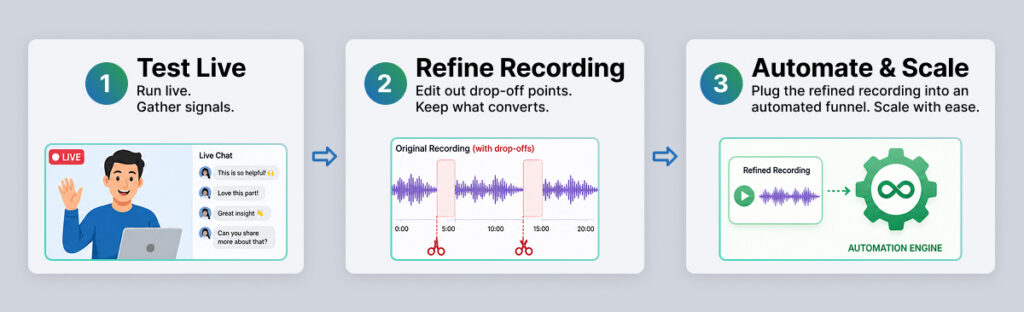
Running it live first gives you raw, real-time feedback you can’t get anywhere else. Pay attention to key viewer signals:
- Where do drop-offs occur?
- Which points trigger questions or objections?
- Does the pitch actually drive sales?
Use real interaction data to edit and tighten your recording. Once your webinar’s core conversion rates are proven, you are ready to create a sales funnel around it.
Step-by-Step Funnel Construction
Once you have a winning presentation, it’s time to build the engine that feeds it. An evergreen funnel works because every piece, from the initial click to the final email, is designed to move a cold prospect to a buying decision without your manual intervention. Here is how to assemble each stage for maximum conversion.
1. Build a High-Intent Registration Page
Your registration page isn’t selling your core product yet; it’s selling the value of spending 45 minutes with you.
- Focus on specific outcomes: Replace vague promises (“Learn how to scale”) with concrete results (“See the 3 ad adjustments that dropped our cost-per-lead by 30%”).
- Keep context clear: State the length, format, and key takeaways upfront.
- Include relevant proof: A short, relatable case study beats long paragraphs of copy.
To maximize conversions, build a second version of your registration page and run an a/b test to see which landing page gets more sign-ups.
2. Reduce Registration Friction
Getting someone to your landing page is only half the battle; actually getting them to submit their details requires making the process as painless as possible. Every point of hesitation, whether it’s an unnecessary question or a confusing start time, gives a busy prospect a reason to close the tab and leave.
To keep your opt-in rates high, stick to requesting just a first name and email address unless your sales team explicitly needs deep qualification data. Every extra form field you add creates friction and lowers conversion. Additionally, if you’re offering sessions on a recurring schedule, make sure your software automatically detects and displays those times in the visitor’s local time zone. Losing a warm lead simply because they miscalculated time zones is an easily avoidable mistake.
3. Optimize the Thank-You Page
Don’t just say “Check your inbox.” A registrant is never more engaged than the second after they submit their email. Use this screen to lock in their commitment.
- Recap the core value: Briefly restate the main problem the webinar solves so they remember why showing up matters.
- Confirm local session timing: Show the exact date and time in their specific time zone.
- Add calendar options: Include direct “Add to Calendar” links for Google, Apple, and Outlook.
- Offer a quick warmup task: Give them a light action, like downloading a one-page worksheet or watching a 60-second intro video.
4. Deploy a Lean Reminder Sequence
Attendance depends entirely on how quickly the session starts after registration:
- Just-in-Time Sessions (Instant Access): These are on-demand webinars that kick off just a few minutes after someone registers, leveraging their immediate high intent. Because they start almost right away, an instant confirmation SMS or email with the direct link is usually all you need.
- Scheduled / Next-Day Sessions: When people register for a set time in the future, rely on a dependable email and SMS sequence to keep them from forgetting:
- Immediate: Confirmation + calendar event link
- 24 Hours Before: Value reminder + core takeaway preview
- 1 Hour Before: Access link + quick nudge
- 15 Minutes Before: Final access link
5. Align the Pitch with Viewer Retention
Getting people to show up is only half the battle; keeping them around long enough to hear your offer is where the actual revenue is made. In a live webinar, you can read the room in real time, but with automated sessions, you have to rely on data to see where people tune out.
Built-in analytics in platforms like EverWebinar let you track drop-off curves down to the exact second. For example, if 40% of your audience leaves at minute 35, but your pitch doesn’t start until minute 50, nearly half your prospective buyers are walking away without ever seeing what you are selling.
Here is how to fix that gap:
- Review your retention graphs: Find the exact points where engagement dips or viewers drop off.
- Adjust your pitch timing: Move your core offer or initial Call-To-Action (CTA) forward so it hits before the major drop-off point.
- Use dynamic on-screen CTAs: Set timed buy buttons or offers to pop up precisely when you present the solution in your video.
(If your numbers are still lagging after making these tweaks, check out our guide on how to fix a pre-recorded webinar that’s not converting.)
6. Maintain Authentic Urgency
Urgency is one of the strongest drivers of action in any sales funnel, but only if it’s believable. In a live webinar, deadlines feel natural because the event is happening in real time. With an automated setup, creating that same sense of scarcity requires strict technical consistency.
Nothing destroys your credibility faster than fake urgency. If your webinar promises an offer expires in 48 hours, but the checkout link stays active a week later, buyers will notice, and you’ll lose their trust.
Here is how to handle deadlines the right way:
- Set a strict deadline window: Pick a clear timeframe (like 48 hours post-webinar) and stick to it.
- Sync your tech stack: Make sure your email automation, sales page, and deadline timers are all tied to that exact registrant’s timeline.
- Test every scenario yourself: Register for your own funnel, skip the session, leave halfway through, click through the offer, and verify that the logic holds up on every single path.
Delivery Formats: Pros & Cons

| Delivery format | Key benefit | Main drawback |
|---|---|---|
| Just-in-Time | Capitalizes on instant buyer intent | “Starting in 3 minutes” can feel artificial |
| Scheduled | Creates an appointment mindset and gives reminder emails time to work | Higher no-show rates because of the delay |
| On-demand | Zero friction, instant access | Lower completion rates without scheduled pressure |
| Hybrid | Live chat layered over recorded video | Requires live staff during scheduled slots |
How to Handle “Live” Features Responsibly
One of the best things about evergreen webinar software like EverWebinar is how easily it brings back that live event energy. Simulated chat, attendee notifications, and timed polls give your presentation momentum, keeping people hooked way longer than a boring, static video player would.
The trick to making simulated features work is keeping everything believable. When you hit that sweet spot, the experience feels active, keeps energy high, and holds attention from start to finish.
A few easy ways to make sure your automated features land:
- Keep chat and counts realistic: Match your simulated chat and attendee numbers to what makes sense for your brand. A steady stream of great questions works; a wall of chaotic spam just distracts from your offer.
- Pair simulated chat with real replies: Let the pre-set chat build atmosphere during the presentation, but route new questions from attendees straight to your email or Slack. That way, viewers get the feel of a live room and real answers from your team.
- Use interactive triggers to keep people watching: Pop-up polls, downloadable worksheets, and timed offers as your presentation unfolds. Give people something to click on so they stay tuned in.
Segmenting Your Follow-Up Sequences
What happens after your webinar finishes is just as important as the presentation itself. The biggest mistake you can make is treating every registrant the same once the session ends. Someone who stayed through your entire pitch and saw the price on screen has completely different needs than someone who got pulled into a meeting and missed the whole thing.

Sending a generic “Here’s the replay!” blast to your entire list completely ignores valuable viewer data. To get the highest return from your funnel, split your follow-up emails into three distinct behavioral tracks based on what each person actually did:
- Non-Attendees: They signed up, but life got in the way. Focus entirely on getting them to reschedule or catch the recording. Don’t try to hard-sell the product yet, they haven’t seen your pitch or understood the real value.
- Early Leavers: They were interested enough to show up, but dropped off before you brought out the offer. Highlight a quick summary of what they missed, tackle potential time-commitment concerns, or give them a direct link to jump straight to the core lesson.
- Offer Viewers: They stayed for the pitch, saw the product, but hesitated. This group is warm and close to buying. Use your follow-up sequence to directly tackle common objections, like money-back guarantees, implementation timelines, ongoing support, or payment options.
Optimization Strategy
Once your evergreen funnel is live, resist the urge to tweak random pieces all at once. If your revenue isn’t where you want it to be, it’s usually caused by a single bottleneck earlier in the process, and changing downstream pages won’t fix an upstream issue. For example, rewriting your sales page copy won’t do much if your opt-in page is only converting 5% of your traffic and nobody is actually making it to the pitch.
To optimize efficiently, work through your funnel in the exact order a prospect experiences it. Focus on fixing one constraint at a time, tracking these core metrics in sequence:
- Landing Page Conversion: Is the headline and value proposition compelling enough to get clicks?
- Attendance Rate: Are your scheduling choices and reminder emails actually getting people into the session?
- Retention Rate: Is the presentation pacing strong enough to keep viewers engaged until the pitch?
- Offer Conversion: Is the core pitch and urgency resonating with the people who stay to see it?
- Revenue per Registrant: Looking at the whole picture, is the complete system generating enough total return on your traffic investment?
Turn Your Best Presentation Into a Lasting Asset
An evergreen webinar funnel isn’t a shortcut to avoid doing the work; it’s a way to make sure the great work you’ve already done keeps working for you.
Once you take a proven presentation, wrap it in smart automation, and pay attention to where people register, drop off, and buy, you stop trading time for every single sale. You build an asset that generates revenue around the clock, giving you the freedom to focus on growing the rest of your business.
Frequently Asked Questions
Is an evergreen webinar the same as a video replay?
No. A replay is a static link to a past event. An evergreen webinar is an automated system that delivers a dynamic experience, including personalized session timing, timed CTAs, and automated deadline sequences, to each new registrant.
Do evergreen webinars convert as well as live webinars?
Live webinars usually hit higher conversion rates due to direct interaction. However, evergreen webinars operate 24/7 without extra delivery time, making their total revenue potential significantly higher.
Should I disclose that the webinar is pre-recorded?
You don’t need to brand it as “RECORDED” in your headlines, but you should avoid explicitly lying about being live. Good content speaks for itself regardless of delivery format.