




Table of Contents
An on-demand webinar is a recorded online presentation people can watch on their own schedule. Instead of attending a live session at one fixed time, the viewer can register and access the webinar when it is convenient.
That flexibility is useful, but the recording alone is only the starting point.
For education, a simple replay may be enough. For sales, demos, course offers, coaching applications, consulting funnels, and lead nurture, the experience around the recording matters just as much as the recording itself.
A recording solves the timing problem. Automation solves the experience problem.
When an on-demand webinar is delivered through automated webinar software, it can become a more structured evergreen asset: registration, reminders, Just-in-Time access, timed engagement, offers, countdowns, replay access, analytics, and follow-up.
What Is an On-Demand Webinar?
An on-demand webinar is a recorded webinar presentation that viewers can access when they choose. It is usually delivered after registration through a replay page, webinar room, email link, or automated webinar platform.
The simplest version is straightforward: someone fills out a form and watches a recording.
That can work when the goal is education. A software company might offer a recorded customer training. A consultant might share a replay with leads who missed a live session. A course creator might keep a previous workshop available for people still researching the topic.
But when the webinar has a business goal, the recording has to do more than sit behind a form. It needs to hold attention, build context, present a next step, and continue the conversation after the viewer leaves.
That is why the stronger version of an on-demand webinar is not just a video people can watch. It is a recorded presentation delivered inside a planned experience.
EverWebinar is built for that more structured use case: automated, evergreen, recurring, scheduled, Just-in-Time, on-demand, and replay-style webinar experiences using recorded content with registration, reminders, timed interactions, offers, replays, analytics, and follow-up workflows.
A Simple Example: From Replay to Funnel
Picture a consultant who runs the same educational webinar twice a month before inviting qualified prospects to apply for a strategy call.
After a few runs, the presentation is no longer changing much. The same objections come up. The same section creates the most interest. The CTA works best near the end, after the consultant has explained the framework.
At that point, keeping the webinar live every time may not be necessary.
The consultant can record the strongest version, make it available on demand, and use automation to preserve the parts that made the live version useful: registration, reminders, a structured viewing experience, a clear application moment, replay access, and follow-up.
The offer did not become stronger because it was automated. The automation simply made a repeatable presentation easier to deliver consistently.
That is the real opportunity. Not “set it and forget it.” More like: prove the message, package the experience, and keep improving the system.
How Is an On-Demand Webinar Different From a Recorded Video?
An on-demand webinar is usually built around a presentation arc and a next step. A recorded video may answer one question. An on-demand webinar usually guides the viewer through a larger idea.
A product tutorial, for example, might show someone how to use a feature. The viewer can jump in, get the answer, and leave.
A product demo webinar has a different job. It may need to explain the problem, show why the current workflow is inefficient, demonstrate a better process, address common concerns, and invite the viewer to book a demo or start a trial.
The same principle applies to courses, coaching, consulting, agencies, and education funnels. A short video can explain one idea. A webinar builds a case.
That does not mean every webinar needs heavy automation. If the viewer only needs information, a simple video or replay may be enough. But if the viewer needs context before taking action, the webinar should be structured around that decision.
How Is an On-Demand Webinar Different From a Live Webinar?
A live webinar happens in real time with a presenter actively hosting the session. An on-demand webinar uses a recorded presentation, so viewers can watch without waiting for the host to go live.
Live webinars are useful when the room itself matters. If the session depends on live Q&A, audience participation, timely discussion, or real-time objection handling, live delivery may be the better fit.
On-demand webinars work better when the message is stable enough to repeat.
A coach testing a new offer may learn more from a live session because audience questions reveal where the message is unclear. A SaaS team with a refined workflow demo may not need to present the same early-stage walkthrough live every day. A course creator with a strong launch webinar may want new subscribers to access that training throughout the month.
A practical rule:
Use live webinars to learn. Use on-demand webinars to repeat what is already clear.
If the topic, promise, offer, or CTA is still changing every week, automation may repeat uncertainty instead of solving it. If you want the event-like feel of a live session without presenting every time, EverWebinar’s simulated live webinar features are the closer fit.
Why Automation Makes an On-Demand Webinar More Useful
On-demand access makes the webinar available. Automation makes the experience intentional.
A plain replay says, “Here is the recording.”
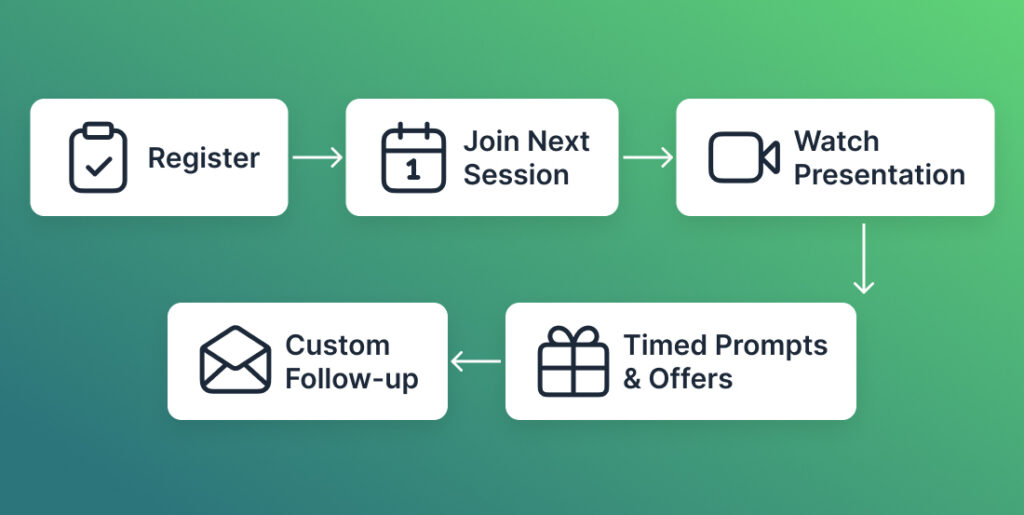
An automated on-demand webinar can guide the viewer through a sequence: register, join the next available session, watch the presentation, receive timed prompts or resources, see the offer when it becomes relevant, and receive follow-up based on what happened.
EverWebinar’s workflow supports recorded webinar content, scheduling rules, registration, notifications, timed interactions, replay behavior, analytics, and registrant records.
That structure matters because sales and nurture webinars usually are not just about delivering information. They are about helping the viewer make a decision.
A course creator does not only need viewers to watch a lesson. They need viewers to understand why the course is the right next step.
A consultant does not only need prospects to hear an idea. They need prospects to understand the problem well enough to apply for a call.
A SaaS team does not only need people to see features. They need prospects to understand a use case and decide whether a demo, trial, or product conversation is worth their time.
Automation does not make those decisions for the viewer. It gives the webinar a more consistent path to support them. For teams that want a recorded presentation to run as an ongoing automated asset, EverWebinar’s evergreen webinar software page explains that product use case in more detail.
The Mistake: Treating On-Demand Access as the Strategy
The most common mistake is assuming that “available anytime” is enough.
It rarely is.
Availability removes a scheduling barrier, but it does not automatically create attention, trust, urgency, or follow-through. A viewer can access the webinar instantly and still abandon it after a few minutes. They can understand the idea and still miss the CTA. They can want the replay and still forget to return.
An on-demand webinar needs a job before it needs a tool.
A course sales webinar needs to move the viewer from problem awareness to belief in the method, then to the course offer.
A coaching webinar needs to help the viewer understand whether the approach fits their situation before applying.
A SaaS demo webinar needs to show a use case clearly enough that the viewer sees why a live demo, trial, or product conversation is worth their time.
A customer training webinar needs to help the viewer complete a task or adopt a workflow.
Those are different jobs. They should not all use the same CTA, timing, replay rules, or follow-up.
An on-demand webinar is the format. The strategy is what the webinar is supposed to help the viewer do.
That mistake becomes more expensive once automation enters the picture, because the system does not improve the webinar for you. It repeats what you give it.
How Just-in-Time Scheduling Works
Just-in-Time scheduling lets a viewer register and join a webinar session that starts soon, often within minutes.
That keeps the convenience of on-demand access while preserving more of the structure of a webinar session. The viewer does not simply land on a video page. They enter a session, follow the presentation, and see the content in the order it was designed.
This can work well when someone arrives with high intent.
A SaaS prospect researching a workflow problem during the workday may not want to wait until next Thursday for a demo-style webinar. A course buyer who just clicked from an email may be more likely to watch while the topic is fresh. A coaching lead may want to understand the method before deciding whether to apply.
EverWebinar’s Just-in-Time scheduling supports this near-term access model, which can help an on-demand webinar feel more like a guided event without requiring the presenter to host each session live.
The tradeoff is commitment. When something is available immediately, people sometimes treat it as disposable. That means the registration promise has to be specific enough to make the session feel worth attending now.
How Countdown Timers Support Purchase Decisions
A countdown timer can help an on-demand webinar create a clear decision window. It can show when replay access ends, when a bonus expires, when an application window closes, or when a webinar-specific next step is available.
The timer should clarify the offer. It should not compensate for a weak one.
A useful countdown tells the viewer what is available, how long it is available, and what happens when the window closes. A weak countdown adds pressure without explaining why the deadline exists.
For example, a countdown can make sense when a consultant reviews applications during a defined window after the webinar. It can make sense when a course bonus is attached to a specific replay period. It can make sense when the next step is tied to a limited onboarding cohort.
It is weaker when the timer is just visual pressure.
EverWebinar’s countdown timer can support purchase decisions by making a deadline visible inside the webinar experience. The safest approach is to tie that timer to a real decision point rather than using urgency for its own sake.
What a Realistic On-Demand Webinar Sales Setup Looks Like
A useful on-demand webinar sales setup does not start with the video. It starts with the path the viewer is taking.
| Stage | What it must accomplish | Failure signal |
| Registration | Make the webinar feel worth attending now | People visit the page but do not register |
| Access | Get the viewer into the session while intent is fresh | Registrants do not watch |
| Presentation | Build understanding before the offer appears | Viewers leave before the CTA |
| Offer | Make the next step feel logical | Viewers watch but do not click |
| Follow-up | Match the viewer’s behavior | Everyone receives the same generic sequence |
| Review | Identify the weakest part of the funnel | Changes are made randomly instead of strategically |
This is the difference between posting a replay and building an evergreen asset.
A replay is a content asset. An automated webinar funnel is a delivery system around that asset.
EverWebinar helps with that delivery system: registration, scheduling, reminders, timed interactions, offers, replay access, analytics, and follow-up. The platform handles the repeatable workflow, while the business still has to supply the right topic, presentation, offer, and follow-up logic.
Who Should Use an On-Demand Webinar?
An on-demand webinar is useful when the same explanation needs to be delivered repeatedly to people who arrive at different times.

A course creator might use one after a live launch. The original webinar explains the problem, teaches the course framework, and introduces the offer. Instead of letting that recording sit in a folder, the creator can turn it into an on-demand training that new subscribers can attend throughout the month.
A consultant might use one before applications. Instead of explaining the same methodology on every first call, the consultant can ask prospects to watch the webinar first. Better-fit leads arrive with more context, and poor-fit leads may self-select out.
A SaaS team might use one between a website visit and a sales demo. The webinar can explain a workflow more completely than a product page without forcing every prospect onto a live call.
An agency might use on-demand webinars for clients who already have traffic but need a better education step between lead capture and sales.
The pattern is not industry-specific. It is workflow-specific.
On-demand webinars are useful when the presentation can be repeated, the viewer needs more than a short video, the next step benefits from education, the audience arrives at different times, and the business wants a consistent delivery experience.
If the message changes constantly or the viewer needs live feedback, on-demand delivery may not be the right starting point.
When an On-Demand Webinar Is Not Enough
An on-demand webinar will not fix a weak offer, unclear promise, or unfocused presentation.
This is where automation can create false confidence. Because the system can run repeatedly, it is tempting to assume the webinar is working simply because it is available.
But automation repeats whatever you give it.
If the registration page attracts the wrong audience, automation sends more of the wrong people into the session.
If the first ten minutes are slow, automation repeats that slow opening every time.
If the offer is unclear, automation presents the same unclear offer at scale.
If the follow-up ignores attendee behavior, automation sends irrelevant messages more efficiently.
Before turning a recording into an automated on-demand webinar, ask a harder question:
Would this presentation be useful and persuasive if I delivered it to one qualified person today?
If the answer is no, improve the webinar before automating it.
How to Set Up an On-Demand Webinar
Use this process to turn a recorded presentation into a stronger on-demand webinar experience.
1. Choose a Topic With a Real Decision Behind It
A good on-demand webinar topic is not just interesting. It helps the viewer make progress toward a decision.
For a course creator, that decision might be whether the course is the right next step. For a SaaS buyer, it might be whether the product workflow is worth a demo. For a coach, it might be whether to apply for a call.
A weak topic creates casual interest. A strong topic creates qualified attention.
Instead of “Marketing Tips for Coaches,” a better topic might be “How Coaches Can Use a Webinar to Educate Prospects Before an Application Call.”
Instead of “Product Demo,” a better topic might be “How to Automate the First Step of Your Client Onboarding Workflow.”
Specificity does not make the webinar smaller. It makes the right viewer more likely to stay.
2. Prepare the Recording for On-Demand Viewing
A live recording often needs editing before it becomes an on-demand webinar.
Remove the moments that only made sense live: waiting for people to join, audio checks, date-specific references, long pauses, outdated offer details, and Q&A that lacks context.
Also review the honesty of the experience. If there is no live presenter or live chat, do not script the recording as if there is. A webinar can feel event-like without pretending to be live.
The recording should answer three questions early:
- Who is this for?
- What will they understand by the end?
- What next step will the webinar help them evaluate?
Those three answers create orientation. Without them, viewers are more likely to drift.
3. Build a Registration Page That Creates Commitment
The registration page should not simply announce a webinar. It should give the viewer a reason to attend.
A common mistake is hiding behind vague language:
Free training: grow faster with webinars.
That might sound broad, but it does not create much commitment.
A stronger version:
Learn how to turn a recorded presentation into an on-demand webinar funnel with registration, timed offers, replay access, and follow-up.
That promise is more concrete. It filters better. It also sets the expectation that this is not just a casual replay.
4. Choose the Right Access Model
Not every on-demand webinar needs the same access model.
Immediate access works when the viewer wants information right away and the CTA is low-friction. It is useful for education-heavy content or product walkthroughs.
Just-in-Time access works when you want the viewer to join soon but still experience the webinar as a structured session. This is often a strong fit for high-intent traffic.
Scheduled access works when the session benefits from more commitment. If the topic is complex or the offer requires attention, asking someone to choose a time can create a stronger sense of attendance.
Replay access works as a second chance. It should be planned, not treated as a dumping ground for everyone who missed the session.
EverWebinar can support scheduled sessions, recurring sessions, Just-in-Time access, Instant Replay, and on-demand-style access where configured.
The right choice depends on the webinar’s job. A customer training replay and a sales webinar for a high-ticket consulting offer should not necessarily use the same access rules.
5. Add Reminders That Resell the Reason to Attend
A reminder should not only say, “Your webinar starts soon.”
It should bring the viewer back to the reason they registered. Good reminders are short, specific, and tied to the webinar promise.
For example:
Your session is coming up. You’ll see how to turn one recorded presentation into a repeatable webinar funnel, including where to place the offer and how to follow up with people who miss the session.
That is more useful than a generic calendar reminder because it reactivates intent.
For immediate access, reminders may be minimal. For scheduled, Just-in-Time, or replay-style sessions, they can help prevent the registration from becoming another forgotten tab.
6. Use Timed Engagement Only When It Helps the Viewer
Timed engagement should support the presentation, not decorate it.
A poll can reveal intent. A handout can make the lesson easier to apply. A timed message can clarify a key point. An offer can appear when the viewer understands why the next step matters.
EverWebinar can support timed messages, polls, handouts, offers, and other automated room events where configured. Use them with restraint. If an interaction would feel annoying in a live room, it will probably feel annoying in an automated one.
7. Present the Offer After the Webinar Has Earned It
The offer should feel like the next logical step, not an interruption.
By the time the CTA appears, the viewer should understand the problem, the recommended method, and why the offer fits. That CTA might be to enroll, book a demo, apply for a call, start a trial, request a proposal, or watch another training.
The offer timing should match the viewer’s readiness, not the marketer’s impatience.
8. Use Countdown Timers as Decision Clarity
A countdown timer should explain the timing of a real decision window.
It can support a replay deadline, bonus window, application review period, or limited booking window. The useful version says: here is what is available, how long it is available, and what happens next.
The weak version says: act now because the timer is moving.
The first creates clarity. The second creates suspicion.
9. Follow Up Based on Behavior
The follow-up after an on-demand webinar should not treat every registrant the same.
Someone who registered but never watched needs a different message from someone who watched the full session and clicked the offer. Someone who left after eight minutes needs a different path from someone who returned for the replay.
A simple behavior-based follow-up plan might look like this:
- Missed the webinar: send replay access or another session option.
- Left early: remind them of the core promise and invite them back.
- Watched most of the webinar: reinforce the main takeaway and next step.
- Clicked the CTA: answer decision-stage questions.
- Watched the replay: create a clear final path before access ends.
This is one of the biggest reasons to use webinar automation software instead of a plain video page. The follow-up can respond to the webinar experience rather than simply acknowledging that someone filled out a form.
10. Review the Funnel Like a System
An on-demand webinar should not be judged only by whether the recording is good.
Review the whole path. Are the right people registering? Are they attending or watching? Where do they drop off? Do they reach the offer? Do they click? Do they reply with questions? Does the follow-up match what they did?
Avoid inventing universal benchmarks. The more useful approach is to find the weakest step in your own sequence.
If traffic is high and registrations are low, the page promise may be weak.
If registrations are strong and attendance is low, the access model or reminders may need work.
If attendance is strong and offer clicks are weak, the webinar may not be building enough desire or clarity.
If clicks are strong and sales or calls are weak, the offer page, booking flow, or sales process may need review.
Improve one thing at a time. Random changes make the funnel harder to understand.
What Software Do You Need to Run an On-Demand Webinar?
The software depends on how much structure you need.
For a simple on-demand webinar, a landing page, registration form, video host, and email tool may be enough. That setup works when the webinar is mostly educational or when the next step is obvious.
For an automated on-demand webinar, you need a system that can manage more of the experience: registration, scheduled or Just-in-Time access, reminders, timed interactions, offers, countdowns, replay access, analytics, and follow-up.
This is where EverWebinar fits best.
Use a simple replay when the goal is access. Use EverWebinar when you want a recorded presentation to behave more like a guided webinar funnel: available on demand, structured like an event, supported by timed engagement, and able to run repeatedly without the presenter hosting every session live.
EverWebinar is a strong fit when the presentation can be standardized and delivered repeatedly through an automated workflow. It should not be positioned as the primary tool for live webinar hosting; WebinarJam is the better fit when the session depends on live delivery with a presenter.
FAQ
How is an on-demand webinar different from a recorded video?
An on-demand webinar is a recorded presentation with a webinar-style structure, often including registration, a guided lesson, and a clear next step. A recorded video is usually a standalone piece of content someone can watch without that surrounding experience.
The difference matters when the content has a sales, demo, qualification, or nurture job. A video can answer one question. An on-demand webinar can build context and guide the viewer toward a decision.
Can on-demand webinars convert as well as live?
On-demand webinars can support sales and lead generation, but they should not be expected to perform the same as live webinars in every situation. Live webinars may be stronger when the audience needs real-time Q&A, presenter interaction, or timely discussion.
An on-demand webinar is strongest when the message is stable, the presentation is clear, and the next step does not require live delivery every time. Automation can help deliver the experience consistently, but it does not guarantee conversions. The topic, audience fit, offer, traffic source, CTA timing, and follow-up all matter.
What software do you need to run an on-demand webinar?
For a basic on-demand webinar, you may only need a landing page, form, video host, and email tool. For an automated on-demand webinar, you need webinar software that can handle registration, scheduling or Just-in-Time access, reminders, timed engagement, offers, countdowns, replay access, analytics, and follow-up.
EverWebinar is built for the automated version: turning recorded webinar content into a structured webinar experience that can run repeatedly without the presenter hosting each session live.